
AI Agent · Sales Professionals · Executives · Consultants · Founders

MailPilot AI — AI Email AgentThat Manages Your Professional Inbox, Drafts Replies in Your Voice, and Nurtures Every Relationship

The average professional spends 3.1 hours per day on email. Most of it is not worth their time.

MailPilot AI connects to your inbox, learns how you write, manages your incoming emails, drafts replies in your voice, and nurtures your professional relationships automatically — so your inbox works for you, not the other way around.

Learns your email voice — drafts replies that sound exactly like you wrote them
Relationship intelligence — tracks every contact, surfaces relationships going cold
Automated follow-up sequences — never let a prospect or client fall through the cracks
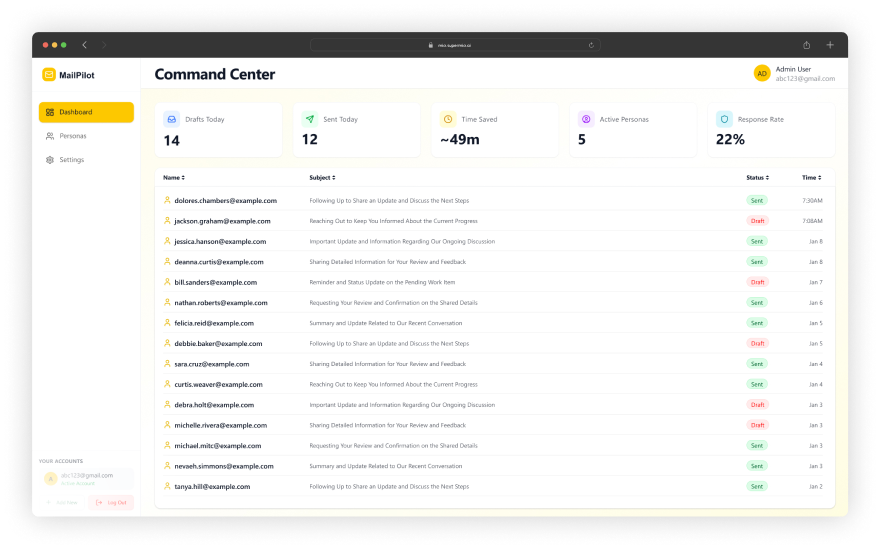
Inbox Performance Overview — see your email health, response times, and open threads
Per-email custom instructions — tell MailPilot exactly how to handle specific conversations
3.1 hrs
Average professional email time per day — MailPilot gives it back
200
Credits/month — start free
1 Setup
Configure Persona once. MailPilot handles the rest.
0 Missed
Follow-ups, responses, and relationships — nothing dropped
MailPilot AI — AI Email Agent for Professional Inboxes
MailPilot
Inbox Connected · 8 Drafts Ready
AI Agent
24
Emails Today
8
Drafts Ready
142
Relationships
Draft a reply to Sarah's proposal email. Keep my usual tone — professional but warm.
✅ Draft Ready — Reply to Sarah K. Subject: Re: Q2 Partnership Proposal 📝 Persona Applied: Professional, warm, concise ✍️ Key points addressed: • Partnership timeline confirmed • Budget clarification included • Next steps proposed Review and send when ready.
Any relationships going cold this week?
⚠️ 2 Relationships Need Attention: ❄️ James M. (Investor) — Last contact: 34 days ago → Reconnect draft ready ❄️ Lisa R. (Key Client) — Last contact: 28 days ago → Follow-up draft queued 📊 142 total contacts tracked ✅ 138 relationships healthy
Persona ActiveInbox Connected📊 Relationship Tracking
Persona
Active
Relationships
142

See What MailPilot AI Actually Does

Real product screenshots. Real features. No mockups.

Inbox Performance

Inbox Performance Overview — See Exactly How Your Email Is Working

Most professionals have no visibility into their inbox performance. They know they're busy — but not whether they're responsive, which relationships they're neglecting, or how many important threads are sitting unanswered. The Inbox Performance Overview gives you that visibility in one dashboard.

Response times. Open threads. Relationship scores. Contact activity. All in one place.

MailPilot AI Inbox Performance Overview — email volume, response rate, relationship scores, and open threads dashboard
AI Email Drafts

AI Email Drafts That Sound Like You Wrote Them

Generic AI email tools produce generic emails. MailPilot produces emails in your voice — because it has learned your Persona: your formality level, your sentence rhythm, your way of opening and closing, your tone in different contexts.

A draft from MailPilot should be indistinguishable from something you wrote yourself. That is the standard it is built to meet.

MailPilot AI Persona Control — email compose view with AI-drafted reply in user voice
Relationship Intelligence

Relationship Intelligence — Know the Status of Every Professional Relationship

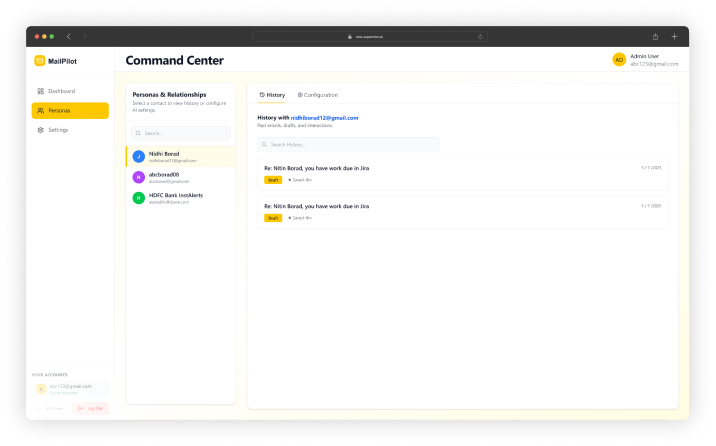
MailPilot tracks every contact you email — automatically building a relationship profile that shows communication frequency, last contact date, relationship score, and pending follow-ups. It surfaces contacts whose relationships are at risk of going cold before you lose the connection.

Not a CRM you have to maintain. Relationship intelligence built into your inbox.

MailPilot AI Relationship Intelligence — contact list with relationship scores, last contact dates, and status indicators
Persona Control

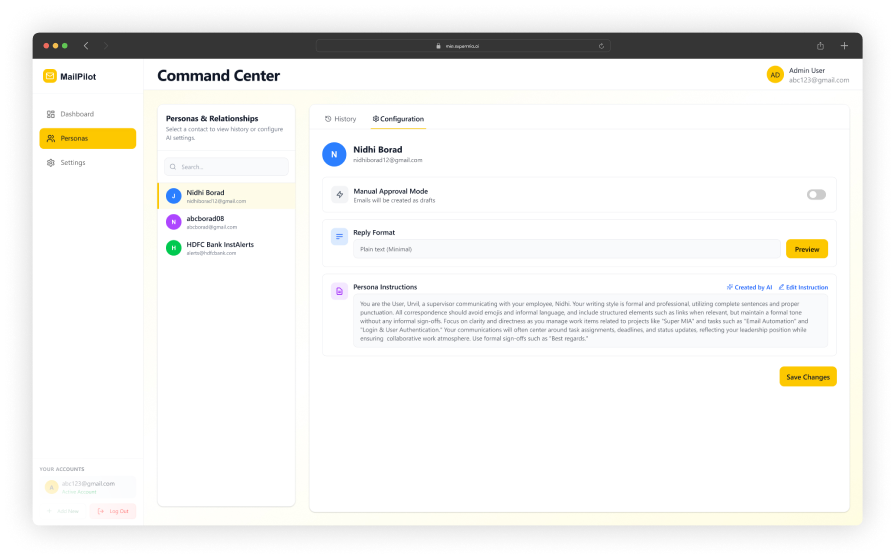
Persona Control — Set It Once, Every Draft Reflects How You Actually Write

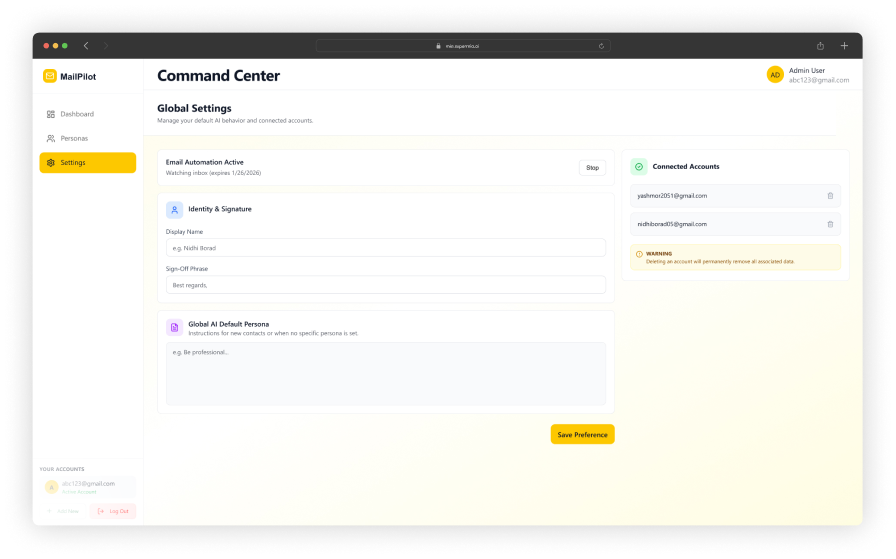
Your Persona is the foundation of everything MailPilot does. Set your communication style — formality, tone, greeting and sign-off preferences, sentence structure, and specific phrases you use. Paste in example emails you have written. MailPilot analyses your patterns and applies them consistently to every draft it creates.

One setup session. Every email after that sounds like you.

MailPilot AI Core Settings — persona configuration screen with tone, formality, and email style controls

Experience MailPilot AI — Pick a Real Email Scenario

Select a scenario and see exactly how MailPilot manages a real professional email situation.

MailPilot
AI Email Agent · Active
✉️ Inbox Connected
You
Draft a reply to Sarah's project update email. She asked 4 questions about timeline, budget, team allocation, and next deliverable.
MailPilot
✅ Draft Ready — Reply to Sarah K. Subject: Re: Project Atlas — Status Update 📝 Persona Applied: Professional, warm, concise ✍️ All 4 questions addressed: 1. Timeline → Confirmed April 15 milestone 2. Budget → Within 3% of forecast 3. Team → 2 additional devs onboarded 4. Next deliverable → API integration by April 8 Tone: Matches your usual client communication style. No filler language.
You
Looks good. Just change 'onboarded' to 'ramped up' — that's how I usually say it.
MailPilot
✏️ Updated — 'onboarded' → 'ramped up' 📤 Ready to send. 💡 Persona note: I've added 'ramped up' to your vocabulary preferences for future drafts.

Draft a reply to a complex email

Senior consultant receives a detailed client email with 4 questions about a project status update. MailPilot drafts a reply addressing each question in the consultant's Persona voice — professional but warm, concise, no filler language. Draft ready in under 10 seconds. Consultant reviews, makes one small edit, sends.

Status — This Scenario

Persona Applied
All 4 Questions Addressed
Draft Ready in <10 Seconds
<10s
Draft Time
4/4
Questions
1
Edits Needed

MailPilot AI — Built for Professionals Whose Relationships Live in Their Inbox

Sales Professionals

SDRs · AEs · Account Managers · BDs

Your pipeline lives in your inbox. MailPilot handles the follow-up sequences, drafts your outreach in your voice, and ensures no prospect goes cold because of delayed responses. Spend your time on calls and demos — let MailPilot manage the email layer.

Follow-up sequencesProposal follow-upsOutreach draftsPipeline managementProspect tracking

Executives & Founders

CEOs · Founders · Partners · Directors

Your time is the most expensive resource in your organisation. MailPilot drafts the replies, manages the follow-ups, and surfaces what actually needs your attention — so you are not spending 3 hours a day in an inbox when you should be doing the work that only you can do.

Stakeholder emailsBoard communicationsInvestor updatesExecutive repliesRelationship nurturing

Consultants & Freelancers

Independent Consultants · Agencies · Client Services

Client relationships are your business. MailPilot's relationship intelligence ensures you never accidentally neglect a high-value client, surfaces the contacts that need attention, and drafts professional client communications in your voice — protecting the relationship quality your business depends on.

Client communicationsRelationship trackingProposal managementFollow-up automationProfessional tone
How It Works

Four Steps From Setup to an Inbox That Runs Itself

01

Set Up Your Persona

Define your communication style. Paste in example emails. MailPilot learns how you write. One-time setup.

10–15 minutes once
02

Connect Your Inbox

Connect your Gmail or Outlook inbox. MailPilot reads your incoming emails and builds your relationship intelligence from your existing email history.

2–3 minutes
03
★ KEY STEP

MailPilot Manages

MailPilot drafts replies, manages follow-up sequences, tracks relationship health, and surfaces inbox insights — all in your voice, all in the background.

Runs automatically
04

Review & Send

Review drafted replies, approve follow-ups, check the Inbox Performance Overview. You stay in control — MailPilot removes the work.

Your review time

Trusted by Professionals Who Value Every Relationship

Enterprise-grade email agent with full data isolation.

Persona-Matched Drafts
Relationship Intelligence
Inbox Performance Overview
Automated Follow-Ups
User-Scoped Data Isolation
Free to Start

Frequently Asked Questions About MailPilot AI

Everything you need to know about AI-powered email management.

Professionals should use MailPilot AI when they spend more than 90 minutes per day on email, when they struggle to maintain consistent follow-up with contacts, or when they want every email they send to reflect their best communication — not the version they wrote at 7pm after a full day of meetings. MailPilot AI is particularly valuable for sales professionals with high outbound volume, executives managing complex multi-stakeholder relationships, consultants with large client contact lists, and anyone who needs to maintain relationship quality across a professional network at scale.
MailPilot AI learns your email writing style through the Persona module — a one-time setup process where you define your communication preferences: formality level, typical greeting and sign-off style, sentence length preference, tone (direct vs conversational), and any specific phrases or conventions you use consistently. You can also paste sample emails you have written so MailPilot can analyse your actual style rather than starting from a blank profile. The more context you provide in the Persona setup, the more accurately MailPilot drafts replies that sound like you wrote them — not like a generic AI.
The Inbox Performance Overview is MailPilot AI's dashboard that gives you a complete picture of your email communication health. It shows: total emails sent and received over the period, average response time, reply rate, unanswered emails and how long they have been waiting, top contacts by volume and relationship score, and trends in your inbox activity over time. The dashboard surfaces which contacts are awaiting a response, which relationships are at risk of going cold, and where your email communication is most and least efficient. It replaces the habit of mentally tracking inbox state with a structured data view.
Relationship intelligence in MailPilot AI is a contact-level tracking system that maintains a profile for every person you email. For each contact it tracks: communication history and frequency, last interaction date, relationship score (calculated from recency, frequency, and response rate), pending follow-ups, and any notes or context you have added. This allows MailPilot to alert you when an important relationship has gone cold, suggest follow-up timing based on relationship patterns, and ensure you never accidentally ignore a high-value contact. Unlike a CRM, relationship intelligence is built directly into your email workflow — no separate data entry required.
MailPilot AI handles email follow-ups automatically using sequences you configure. When you send an email that needs a follow-up (a proposal, an introduction, an unanswered question), MailPilot can schedule a follow-up draft to be sent if no reply is received within a specified time window. Follow-up content is personalised based on the original email context and your Persona settings. You can approve follow-up drafts before they send, or configure MailPilot to send them automatically. Follow-up sequences are managed per contact and respect your configured frequency limits so contacts are never over-emailed.
MailPilot AI gives you configurable control over every level of automation. In draft mode, MailPilot prepares emails and follow-ups for your review and approval before anything is sent — you are always the last step before the email leaves your inbox. In semi-automatic mode, MailPilot sends follow-ups autonomously but surfaces all draft replies for approval. Custom instructions can be set per email or per contact, overriding your default Persona settings for specific conversations. You can pause MailPilot for individual contacts or temporarily disable automation for any email thread at any time. Nothing is sent without your configuration permitting it.
MailPilot AI is designed to work with professional email environments. Current integration support includes Gmail (Google Workspace and personal Gmail accounts) and Microsoft Outlook (Office 365 and Outlook.com). Both integrations include two-way sync — MailPilot reads incoming emails, surfaces drafts in your inbox, and sends via your existing email address so recipients see emails coming from you, not from MailPilot. Additional email platform support is on the MailPilot AI development roadmap. Book a demo to confirm your specific email environment is supported before committing.
MailPilot AI requires 200 credits per month through the SuperMIA Agent Marketplace. New SuperMIA accounts receive free starter credits so you can set up your Persona, connect your inbox, and experience MailPilot in your real email environment before any payment is required. For teams or organisations deploying MailPilot across multiple users — sales teams, executive assistants, client-facing departments — contact SuperMIA for volume pricing and team workspace features.
Your inbox is waiting. MailPilot is ready.

Stop Managing Your Inbox. Start Managing Your Work.

Join professionals using MailPilot AI to draft every reply in their voice, nurture every important relationship, and never let a follow-up fall through the cracks.

Free to start. 200 credits/month. Persona setup in 15 minutes. No credit card needed.

Persona-Matched DraftsRelationship IntelligenceAuto Follow-UpsInbox Performance DashboardGmail & Outlook200 Credits/moStart Free
Related Articles

Email & Campaign Insights

See how AI-driven email and campaign tools help businesses engage and convert.