
Table of Contents
- What is an AI chatbot for SaaS?
- Why SaaS onboarding breaks - and where users leak
- Onboarding chatbot vs standard support chatbot
- 7 ways an AI chatbot improves SaaS onboarding and support
- How to build a SaaS onboarding chatbot (5 steps)
- Chatbot or voice bot for SaaS onboarding?
- How to measure onboarding chatbot impact
- Common SaaS onboarding chatbot mistakes
- What this costs (and how to model ROI)
- Deploy a SaaS onboarding chatbot with SuperMIA
- Frequently asked questions
An AI chatbot for SaaS is an in-product assistant that guides new users through setup, answers "how do I" questions, troubleshoots integrations, and nudges stalled accounts - 24/7. Unlike a basic support bot, it reads the user's account state to give contextual, step-by-step help. Done right, it cuts time-to-value and onboarding tickets while lifting activation and day-30 retention.
Book a 30-minute SaaS onboarding demo →
Key takeaways
- Onboarding ≠ support. An onboarding chatbot is proactive and task-led; a support bot waits to be asked.
- Context is the unlock. Connecting product data turns generic answers into the exact next step.
- Most leakage is silent. 40–60% of signups never finish onboarding, and few open a ticket first.
- Measure time-to-value first. Then activation, day-30 retention, tickets, and CSM time per account.
- No-code is realistic. You can map, connect, and ship onboarding flows without an engineering project.
What is an AI chatbot for SaaS?
An AI chatbot for SaaS is software that lives inside your product and helps users get value fast. It greets new signups, walks them through setup, answers product questions in plain language, fixes common integration errors, and steps in when someone stalls. The good ones read the user's account state, so the help is specific - not a link to a 40-page doc.
This is the same engine behind our MIA Chat Agent, pointed at the onboarding moment instead of generic support. Text handles most in-app cases; for phone-led setups you can pair it with a voice agent (more on that below). For the wider pattern, product-led teams track this closely - see product-led growth benchmarks.
Why SaaS onboarding breaks - and where users leak
Onboarding is where retention is won or lost - and it usually fails quietly. A user signs up, hits one friction point during setup, thinks "I'll come back to this," and never does. No ticket. No cancellation. Just silence.
Four structural reasons it happens:
- CSM bottleneck. Each customer success manager covers 50–200 accounts and can't hand-hold every self-serve signup.
- Time-zone gaps. Your team is offline at 11 PM when the user is trying to connect an integration.
- Repetitive questions. A large share of onboarding questions are the same: "Where's my API key?", "How do I invite my team?"
- Static content can't adapt. Help docs and email drips don't know what the user already configured.
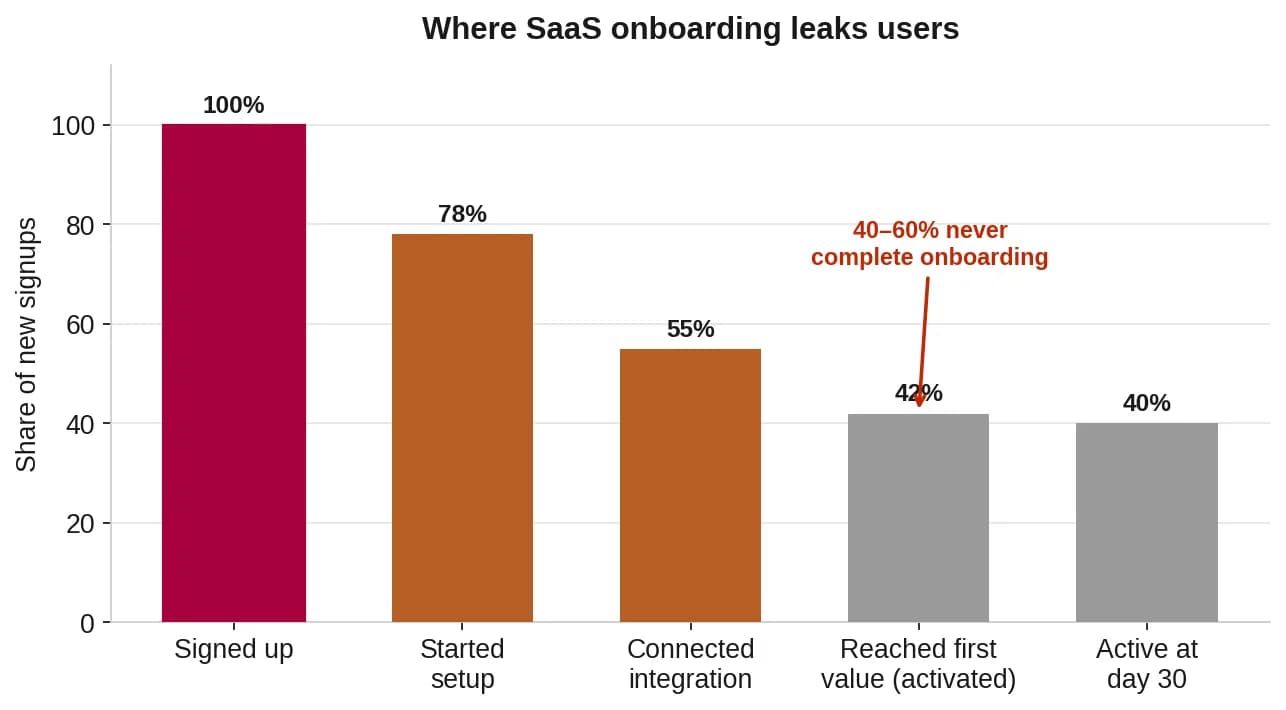
Reported range: across SaaS, teams cite that 40–60% of new signups never complete onboarding, and many who do take 2–4 weeks longer than necessary. Treat as industry-reported, not a guarantee. (See research on early-experience and retention.)
Onboarding chatbot vs standard support chatbot
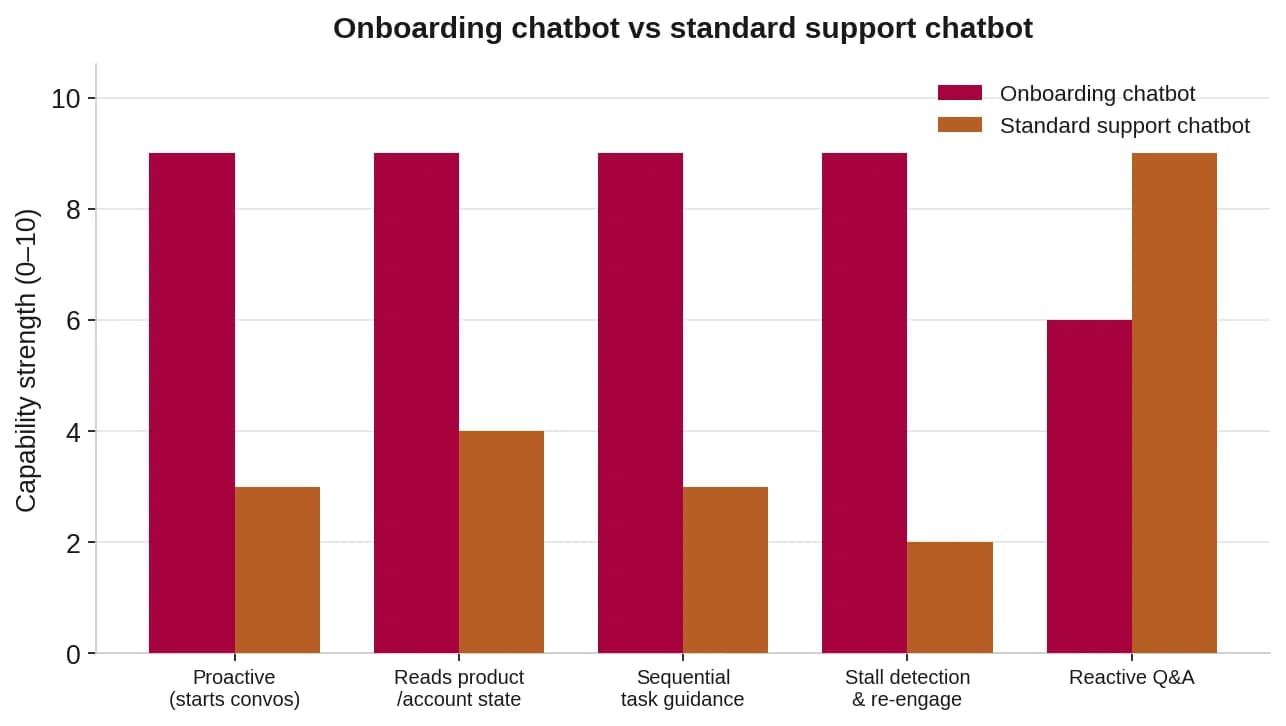
An onboarding chatbot is proactive and task-led; a support chatbot is reactive and issue-led. The difference is whether the bot starts the conversation and knows where the user is.
| Dimension | Onboarding chatbot | Standard support chatbot |
|---|---|---|
| Trigger | Starts conversations at key moments | Waits for the user to ask |
| Context | Reads product/account state | Mostly stateless |
| Goal | Time-to-value & activation | Ticket resolution |
| Shape | Sequential, step-by-step | One-off answers |
| Stalls | Detects inactivity and re-engages | Misses silent drop-off |
7 ways an AI chatbot improves SaaS onboarding and support
1. Setup & configuration guidance. It answers the "how do I…" questions during first setup - account configuration, user roles, and per-platform integration steps - and skips steps the user already finished.
2. Integration troubleshooting. Integration setup is the #1 friction point. The bot diagnoses common errors (API key format, OAuth expiry, sync delays) with specific fixes, not a generic "contact support."
3. Feature discovery & activation. New users find only a fraction of your features. The bot introduces the right one at the right time, framed in value the user already understands.
4. Proactive stall detection. It watches for inactivity - signup with no setup in 48 hours, an integration error with no retry, a quiet week 2 - and sends a specific nudge before the user drifts away.
5. Billing & plan questions. Connected to billing, it answers plan and usage questions with the user's real numbers, heading off the confusion that triggers early churn.
6. Smart escalation to a human. When it can't resolve something, it hands off to a CSM with full context - current step, what was tried, error logs - so no one re-diagnoses from scratch. Pair this with workflow automation that fires the next action to auto-create the ticket.
7. Continuous learning. Every conversation shows which issues recur and which fixes land, so the bot - and your docs - get sharper over time.
See how a chat agent handles your onboarding flow →

How to build a SaaS onboarding chatbot (5 steps)
- Map your onboarding journey. Document signup → first value, and mark where users get stuck (support data) and abandon (analytics).
- Build an onboarding knowledge base. Task-oriented, sequential, error-aware, platform-specific, outcome-focused - separate from your general help center.
- Connect product data. Give the bot completed steps, integration status, plan/entitlements, activity, and error logs via your API.
- Design proactive triggers. Milestone congrats, 48-hour stall, integration error, and feature-ready moments - each with a specific message.
- Set escalation to a CSM. Let the bot handle the routine and deploy an AI chat agent on your product that escalates complex cases with full context.
Chatbot or voice bot for SaaS onboarding?
For in-product, self-serve onboarding, a chatbot is the default - the user is already on screen. A voice bot earns its place for phone-led onboarding, high-touch enterprise setups, and accessibility. Many SaaS teams run both.
If your onboarding includes a setup call, a MIA Voice Agent for phone + voice onboarding can guide users by phone and complete steps live. For the deeper distinction, see why voice agents resolve where bots only deflect.
How to measure onboarding chatbot impact
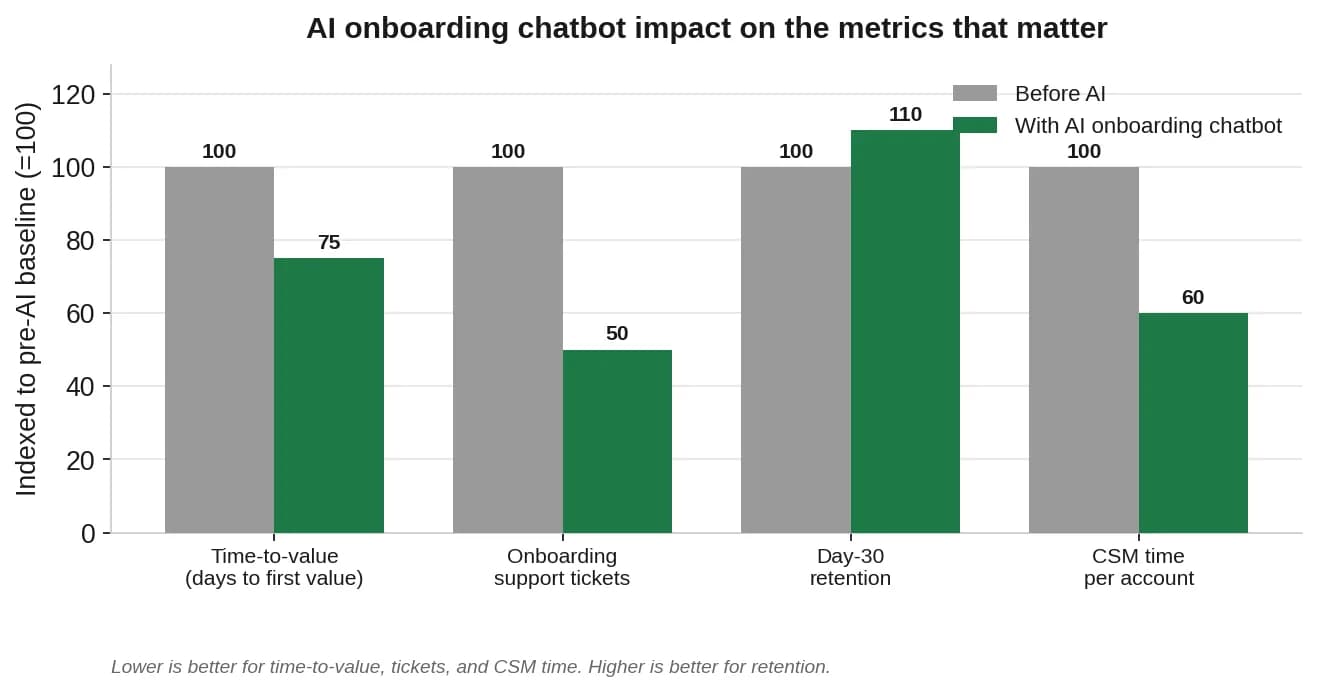
Measure time-to-value first, then activation, retention, tickets, and CSM time. Instrument these in your product analytics and GA4 before you launch, so you have a clean baseline.
| KPI | What it measures | Reported target with AI |
|---|---|---|
| Time-to-value (TTV) | Days from signup to first meaningful use | −20% to −30% |
| Onboarding completion | Finish all steps within 14 days | +15% to +25% |
| Activation rate | Reach a defined activation milestone | +10% to +20% |
| Onboarding tickets | Tickets from users in first 30 days | −40% to −60% |
| Day-30 retention | Still active at day 30 | +5% to +15% |
| CSM time / account | Hours of CSM time per onboarding account | −30% to −50% |
⚠️ Ranges are industry/competitor-reported, not SuperMIA guarantees. Your results depend on product complexity, data integration depth, and trigger design.
Common SaaS onboarding chatbot mistakes
- Generic help instead of context. Sending a stuck user to a broad help article instead of the exact step they're on - a friction pattern Nielsen Norman guidance on onboarding friction warns against.
- No product-data connection. Without account state, the bot can only give one-size-fits-all answers.
- Passive only. A bot that never starts a conversation misses the silent stallers who never ask.
- One-size-fits-all flows. An SMB self-serve signup and an enterprise SSO rollout need different paths - see what changes when you deploy at enterprise scale.
- No handoff. Complex issues need a human; the bot should escalate with full context, not loop.
What this costs (and how to model ROI)
The math is usually simple: an onboarding chatbot pays for itself in the first month through reduced churn and lower ticket volume alone.
Model your own numbers from ticket cost, CSM hours, and recovered activations. For the full method, read our full customer-service chatbot ROI breakdown - it walks through the cost-per-ticket and deflection math step by step.
Deploy a SaaS onboarding chatbot with SuperMIA
You don't need an engineering project to start. With SuperMIA's chat agent, you map the journey, connect your knowledge base and product data, set proactive triggers, and define escalation - no code, most teams live in days. It's the same platform behind our voice and workflow agents, so onboarding, support, and follow-up share one brain.
Book a 30-minute SaaS onboarding demo →
Frequently asked questions
How is a SaaS onboarding chatbot different from a support chatbot?
An onboarding chatbot is proactive and task-oriented: it guides users through sequential setup steps, detects stalls, and introduces features at the right moment. A support chatbot is reactive and issue-oriented, answering questions as they arise. The onboarding bot needs product-data access to know where each user is in their journey.
What data does a SaaS onboarding chatbot need?
It needs the user's completed onboarding steps, integration status, plan and feature entitlements, recent activity metrics, and setup-related error logs. This requires product API integration; without it, the chatbot gives generic guidance instead of contextual, step-by-step help.
How much can an AI chatbot reduce time-to-value in SaaS onboarding?
Teams typically report reducing time-to-value by 20-30%, cutting onboarding support tickets by 40-60%, and improving day-30 retention by 5-15%. The biggest gains come from instant integration troubleshooting and proactive stall detection, the two points where users most often abandon onboarding.
Can you build a SaaS onboarding chatbot without code?
Yes. With a no-code platform like SuperMIA you map the onboarding journey, connect your knowledge base and product data, define proactive triggers, and set escalation rules - without an engineering project. Most teams can go live in days.
Do I need a voice bot or a chatbot for SaaS onboarding?
For in-product, self-serve onboarding, a chatbot is the default because users are already on screen. A voice bot helps for phone-led onboarding, high-touch enterprise setups, or accessibility. Many SaaS teams run both, with the chatbot in-app and the voice agent on the phone line.

Vicky Lalwani
Vicky Lalwani is Marketing Manager at SuperMIA, focused on practical AI education, buyer's guides, and solution explainers that help business teams evaluate and adopt conversational AI across support, sales, and operations.