
Table of Contents
- What an AI voice agent actually does at a healthcare front desk
- The front-desk call mix — where the phone queue really goes
- The 6 front-desk use cases
- Automation potential per use case
- A safe 90-day rollout roadmap
- HIPAA and the BAA — what "aligned" actually means
- When an AI voice agent is not the right answer
- Frequently asked questions
An AI voice agent for a healthcare front desk automates the six workflows that dominate inbound call volume — appointment scheduling and rescheduling, appointment reminders and confirmations, insurance and benefits questions, patient intake, prescription refill requests, and triage or symptom routing — while staying inside a HIPAA-aligned workflow with a Business Associate Agreement on eligible plans.
Book a 20-minute walkthrough — we'll map your call mix and share the 90-day sequence →
Key takeaways
- Six use cases cover roughly 94% of inbound front-desk call volume at a typical US medical practice.
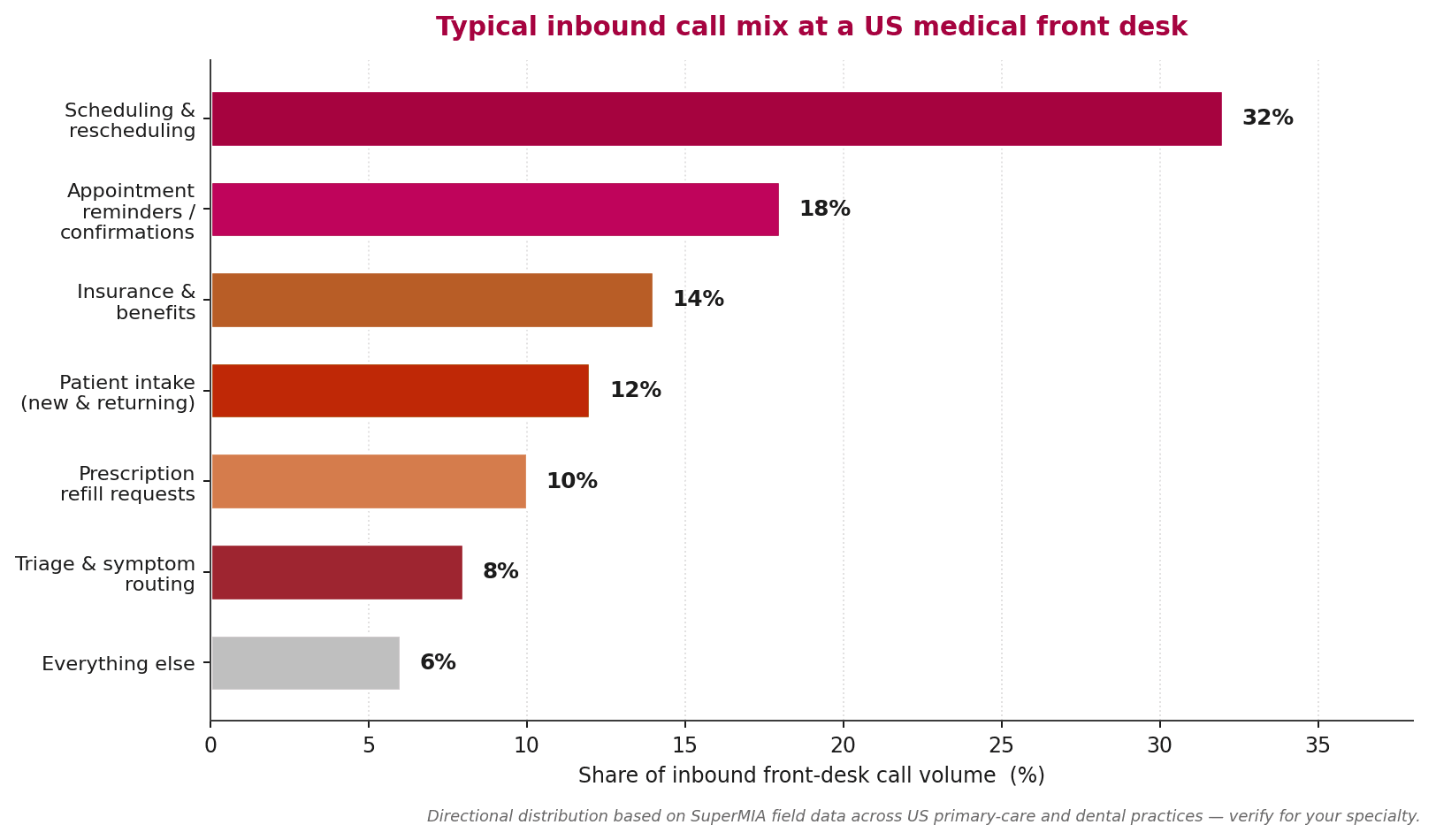
- Scheduling (32%) and reminders (18%) alone clear about half the phone queue — start there.
- SuperMIA is designed to support HIPAA-aligned workflows with a BAA on eligible plans — never "HIPAA certified."
- Triage and symptom routing is the sensitive workflow — always keep a live human warm-transfer path.
- A safe 90-day rollout sequences the six use cases from low-risk to sensitive, not all at once.
What an AI voice agent actually does at a healthcare front desk
An AI voice agent is a conversational AI that answers the phone, understands what the caller is asking for in natural speech, completes the routine work end-to-end, and hands off to a person when the request needs human judgment. At a healthcare front desk that means answering "I need to reschedule Tuesday's visit," "is Dr. Patel in-network for my plan," or "can I refill my prescription" without a receptionist ever picking up.
It is not the same as an old IVR menu. The old "press 1 for scheduling" tree is a routing tool; an AI voice agent is a working front-desk staffer that handles the call to completion.
The important upfront framing: an AI voice agent is a workflow tool, not a clinician. It should never offer diagnostic advice, it should always be able to hand off to a person on demand, and it should sit inside a HIPAA-aligned workflow with a Business Associate Agreement on eligible plans. Every use case below assumes those three rules.
The front-desk call mix — where the phone queue really goes
Before picking use cases, size the automation prize. The chart below breaks down typical inbound call volume at a US primary-care or dental front desk. The important read: two use cases — scheduling and reminders — take half the queue. Everything else fights for the remainder.
This matters because the wrong first use case will feel like the AI "didn't move the needle." Start where the volume is, not where the demo looks best.
The 6 front-desk use cases an AI voice agent can automate
1. Appointment scheduling and rescheduling
What the AI does: understands the caller, checks the practice-management system for open slots, offers appointment options in natural language, books or reschedules the visit, and sends the confirmation. Handles the whole call end-to-end for existing patients, and for new patients if intake is wired in.
Automation potential: high — SuperMIA typically hits ~78% automation on scheduling calls with clean data. Deploy time: 3–5 weeks after PM system integration is confirmed. Honest limit: complex multi-provider bookings with insurance restrictions still need a human — build a warm-transfer path. PHI touch: light — appointment metadata usually stays under BAA scope.
2. Appointment reminders and confirmations
What the AI does: places outbound reminder calls (or receives inbound confirmations), captures the yes/no/reschedule answer, updates the practice-management system, and triggers rescheduling flows on "no." This is the highest-automation, lowest-risk use case — most practices ship it first.
Automation potential: very high — often 90%+ of calls resolved without a human. Deploy time: 1–2 weeks; the fastest first win. Honest limit: patients who want to reschedule during the reminder sometimes need the scheduling agent — chain both use cases together. PHI touch: minimal.
3. Prescription refill requests
What the AI does: verifies the patient, confirms the medication + pharmacy on file, submits the refill request through the practice's e-prescribing workflow, and flags anything a provider needs to approve. Almost always chained with an SMS confirmation to the patient.
Automation potential: high — about 80% of routine refills complete without human touch. Deploy time: 3–4 weeks; needs e-prescribing integration. Honest limit: controlled substances and provider-approval-required medications always route to a person. PHI touch: medium — medication data is PHI; BAA scope must include this workflow explicitly.
4. Patient intake
What the AI does: for new or returning patients, collects demographics, insurance details, reason-for-visit, and consent for treatment — either during the booking call or as a follow-up call before the appointment. Writes structured data directly to the EHR or intake form.
Automation potential: solid — about 70% of intakes complete without a human. Deploy time: 4–6 weeks; EHR integration is the pacing item. Honest limit: complex medical history collection still benefits from a nurse review before the visit. PHI touch: high — full BAA scope + strict data-residency controls required.
5. Insurance and benefits questions
What the AI does: answers common "is Dr. X in-network," "what's my copay," "is this procedure covered" questions using the eligibility APIs the practice already has. Escalates anything the eligibility API can't answer to a human, with the caller's context already loaded.
Automation potential: moderate — about 55% end-to-end. Deploy time: 4–6 weeks. Honest limit: nuanced coverage disputes are not a voice-agent job; they need a human plus documentation. PHI touch: high — insurance information is PHI; BAA scope required.
6. Triage and symptom routing (guarded)
What the AI does: for symptom calls, asks clinician-approved screening questions and routes the caller to the right destination — same-day appointment, nurse callback, urgent care direction, or an emergency-services referral. The AI does not diagnose, does not offer treatment advice, and always has a live human warm-transfer path.
Automation potential: careful — about 45% end-to-end routing, with human backup on demand. Deploy time: 6–10 weeks; the pacing item is clinical-team signoff on the screening tree. Honest limit: this is the sensitive use case — build guardrails with clinical leadership, run humans in parallel through the first 30 days, and monitor every routed call for accuracy before scaling. PHI touch: highest.
Automation potential per use case — the scoring matrix
Every use case is not equal. The matrix scores the six along four dimensions — automation share the AI can realistically hit, average-handle-time reduction against the human baseline, HIPAA sensitivity, and time-to-live. Higher scores mean stronger fit — except in the HIPAA-sensitivity row, where a higher score means the workflow is tighter and needs more compliance controls, not that it's better to automate.
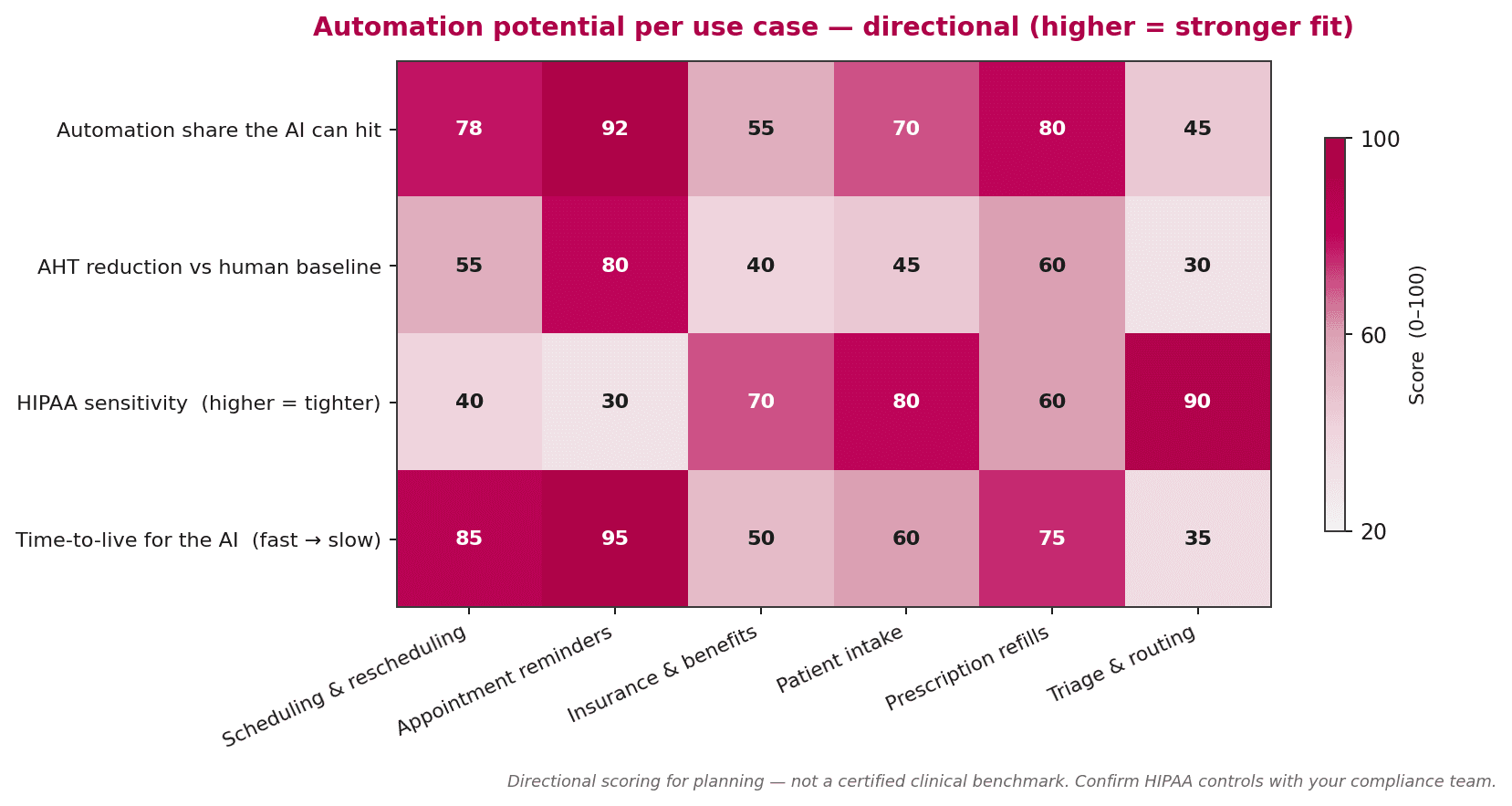
Read left to right. The first two use cases — scheduling and reminders — score high across the board and are safe first bets. Insurance and triage score lower on automation share and higher on HIPAA sensitivity; both need more compliance and clinical work up front, which is why they land later in the rollout.
A safe 90-day rollout roadmap
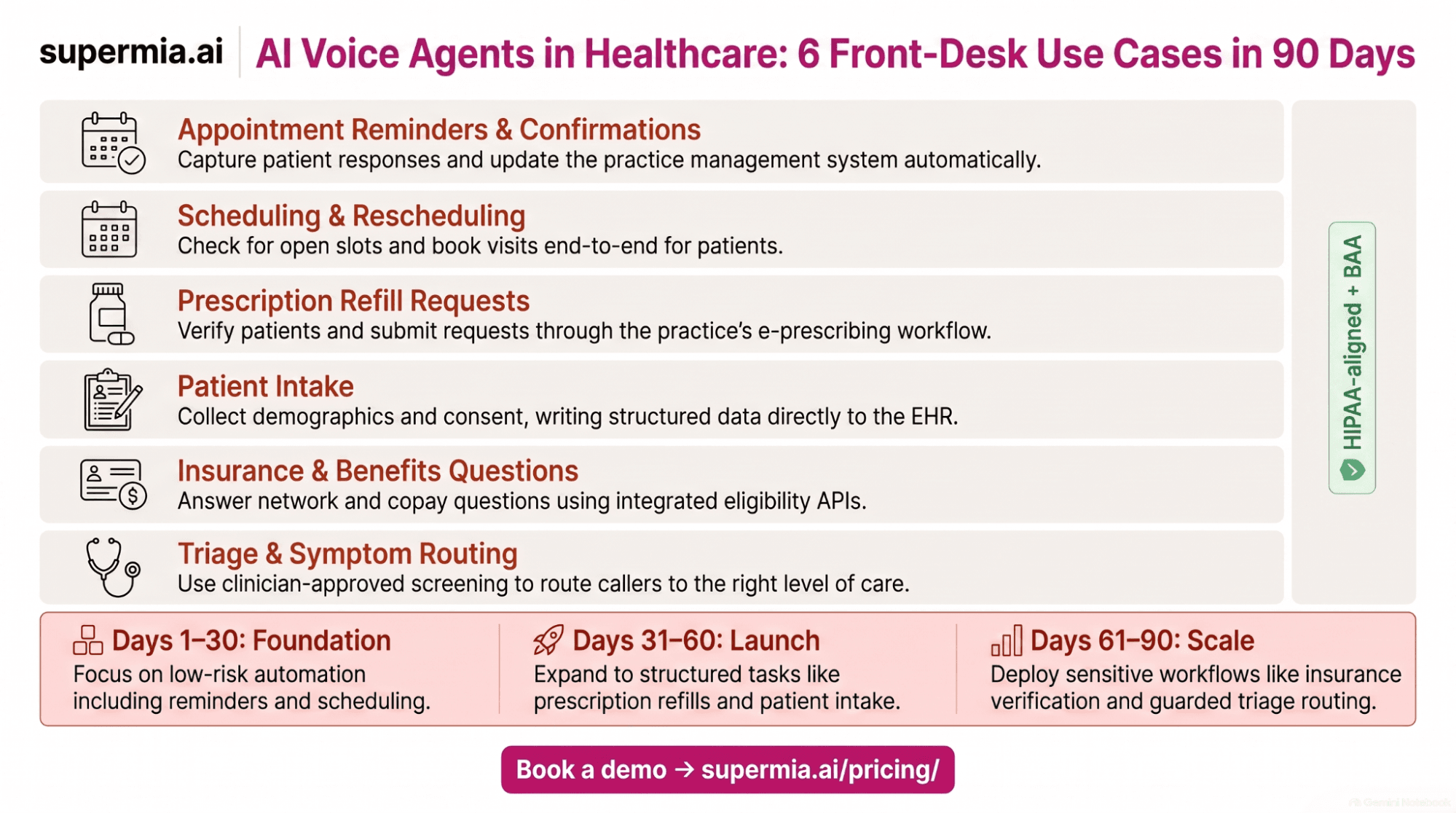
The right sequence matters as much as the right use cases. SuperMIA's recommended 90-day rollout goes from low-risk to sensitive workflows, so the AI proves itself on easy calls before touching PHI-heavy ones. Every phase runs the AI and humans in parallel until compliance signs off.
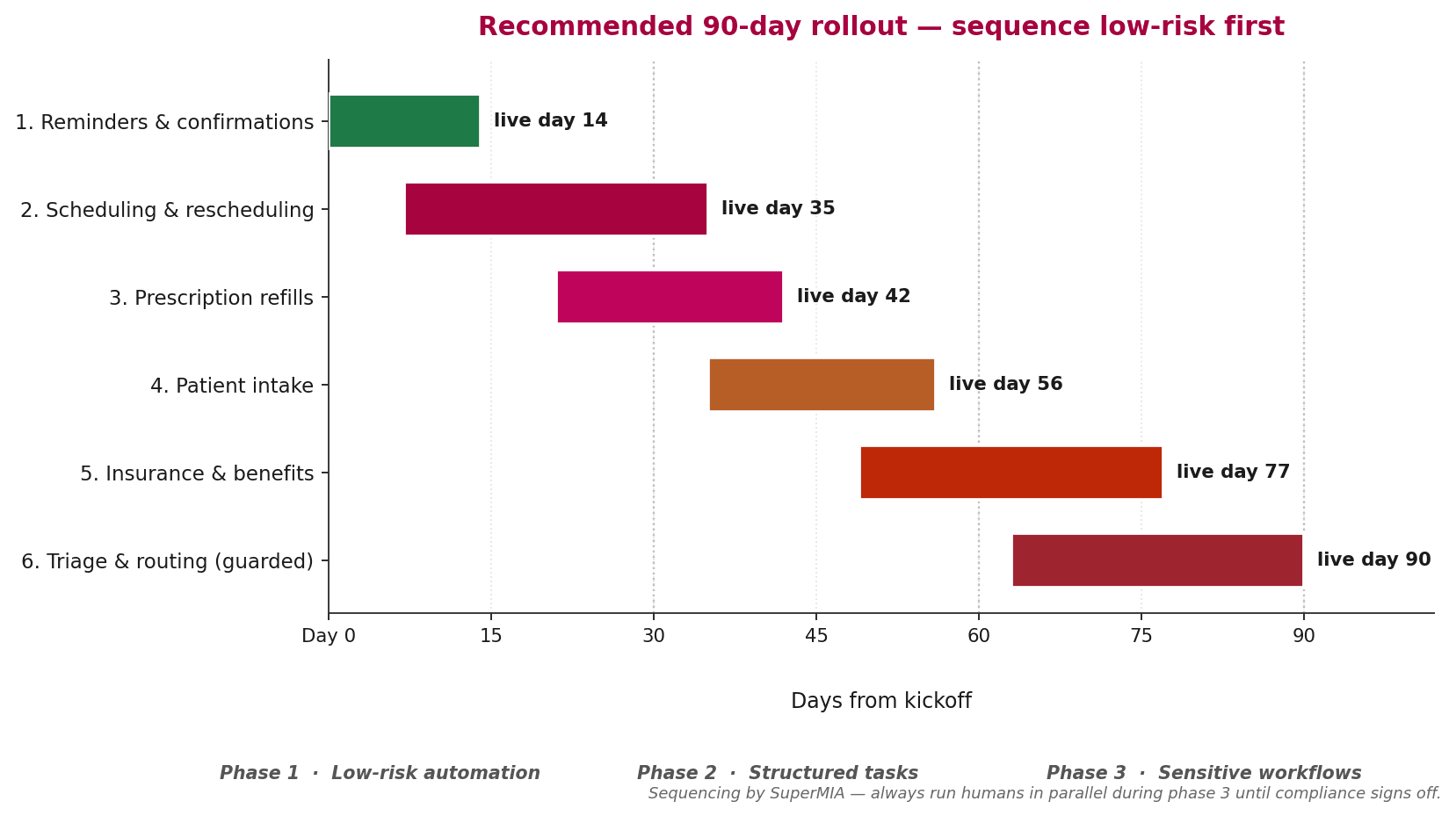
Phase 1 (days 0–30) — low-risk automation. Reminders go live by day 14. Scheduling by day 35. Both use a small PHI surface. Success metrics are call-answer rate and appointment-book rate. Phase 2 (days 30–60) — structured tasks. Prescription refills and patient intake come online; PHI scope widens; BAA coverage is verified. Phase 3 (days 60–90) — sensitive workflows. Insurance and benefits, then triage and symptom routing with humans always in parallel and every call reviewed for accuracy.
HIPAA and the BAA — what "aligned" actually means
Here is the piece most vendor blogs get wrong. A conversational AI product is not "HIPAA compliant" as a checkbox. Compliance is a workflow property, not a product certification. What you can ask a vendor is whether they are designed to support HIPAA-aligned workflows and whether they sign a Business Associate Agreement on eligible plans.
SuperMIA is designed to support HIPAA-aligned workflows, with a BAA available on eligible plans. Before any PHI touches the platform, confirm the BAA scope in writing — which workflows are covered, where data lives, how long it is retained, and what the incident-response commitment is.
Two red flags in vendor conversations. First, any product marketed as "HIPAA certified" — HIPAA has no certification; that is over-claiming. Second, any vendor that will not put the BAA on the table before the second call — that's a procurement-review problem waiting to happen.
When an AI voice agent is not the right answer
There are practices where an AI voice agent is not the right first investment — and it is worth naming them so you do not buy the wrong tool.
- Very low call volume (fewer than about 40 calls a day) — the human staffer is already handling it well, and the AI investment does not pay back.
- High share of complex clinical calls — if scheduling is a small share of calls and most volume is nurse consultation, prioritize agent-assist for the humans first.
- No integrated practice-management system — an AI voice agent needs to write into your scheduling and EHR; without that surface, half the automation value stays on the table.
- No signed BAA path — if the vendor cannot get you a BAA, do not process PHI through them, full stop.
For the broader picture of how MIA supports patient engagement, see MIA for healthcare patient engagement, or the wider SuperMIA for healthcare overview.
Frequently asked questions
What front-desk use cases can an AI voice agent automate in healthcare?
An AI voice agent for a healthcare front desk automates six workflows: appointment scheduling and rescheduling, appointment reminders and confirmations, insurance and benefits questions, patient intake, prescription refill requests, and triage or symptom routing. Together those six cover roughly 94% of inbound front-desk call volume in a typical US primary-care or dental practice.
Is an AI voice agent HIPAA compliant?
A conversational AI is not "HIPAA compliant" as a checkbox. A vendor can be designed to support HIPAA-aligned workflows and can sign a Business Associate Agreement on eligible plans. SuperMIA is designed to support HIPAA-aligned workflows with a BAA on eligible plans. Confirm the BAA scope with the vendor before handling any protected health information.
Can an AI voice agent do medical triage?
An AI voice agent can route symptom calls to the right destination — same-day appointment, nurse callback, urgent care, or emergency services — using guardrails written with the clinical team. It should not offer diagnostic advice, and every triage flow should have a live human warm-transfer path so a patient can reach a clinician on the same call.
How long does it take to deploy an AI voice agent at a healthcare front desk?
SuperMIA's recommended 90-day rollout sequences the six use cases from low-risk to sensitive — reminders live by day 14, scheduling by day 35, prescription refills by day 42, patient intake by day 56, insurance and benefits by day 77, and triage routing by day 90 with a human warm-transfer path always available.
How much of a front desk's call volume can an AI voice agent handle?
Front-desk call mix is typically about 32% scheduling and rescheduling, 18% appointment reminders and confirmations, 14% insurance and benefits, 12% patient intake, 10% prescription refill requests, 8% triage and symptom routing, and 6% everything else. Automating the first two use cases alone usually clears half the phone queue.
What are the risks of AI voice agents in healthcare?
The main risks are three: PHI exposure if the BAA scope is unclear, incorrect triage routing if guardrails are missing, and patient trust erosion if handoff paths to a human are slow. All three are manageable with a signed BAA, clinical-team-owned guardrails, and a warm-transfer path that reaches a human within seconds when the patient asks. Compare SuperMIA plans for eligibility details.

Urvil Dhanani
Urvil Dhanani is the AI/ML Lead at SuperMIA, focused on the architecture behind reliable conversational AI - agent design patterns, voice and chat orchestration, and platform evaluation. He writes practical, vendor-neutral guides that help technical teams build and choose AI systems that hold up in production.