
Table of Contents
- Quick Answer
- What Voiceflow Actually Is (and What It's Genuinely Good At)
- The Prototype-to-Production Gap
- Why Hybrid Architectures Feel Slower in Production
- The Question Nobody Asks: Design Problem or Production Problem?
- If the Design Is the Problem - Replace the Builder
- If Production Is the Problem - Keep the Design, Change the Runtime
- Where SuperMIA Fits (and Where It Doesn't)
- Frequently Asked Questions
Quick Answer
Voiceflow is a design and prototyping tool, not a production runtime — its canvas is excellent, but real-time voice depends on external telephony, speech-to-text and text-to-speech that you connect yourself. So ask which layer is failing you. If the canvas is too limiting, replace the builder with Botpress or Rasa. If production is the problem, keep the design and put a real runtime underneath it.
Key Takeaways
- Voiceflow is a design tool, and a genuinely good one. Ease of use is the most-praised thing in its reviews. That isn't the problem.
- Production is where it stops. Telephony, speech-to-text and text-to-speech come from third parties you wire up yourself, and it's cloud-only.
- Every hop between vendors costs milliseconds. More external services in the path means more round trips — that's architecture, not a benchmark.
- ‘No-code’ doesn't mean ‘no learning curve.’ Reviewers say the blocks, conditions and variables take real time to get comfortable with.
- You may not need to replace it at all. If the design worked and production didn't, keep the canvas and change the runtime.
Designed it in Voiceflow, can't ship it?
Book a 15-minute demo and hear a runtime with the phone line already in it.
Book a demo →What Voiceflow Actually Is (and What It's Genuinely Good At)
Let's start by being fair, because most of this SERP isn't. Voiceflow's own platform is a no-code conversational AI platform built around a drag-and-drop canvas. You connect blocks, model the conversation, test it, and ship it — without writing code. It supports chat and voice, integrates a knowledge base, offers API access and code blocks for teams that want them, and holds ISO 27001 and SOC 2 certifications.
And here's the thing worth saying out loud: the canvas is excellent. Ease of use is the single most-mentioned positive across Voiceflow's reviews — with over 80 separate mentions praising the drag-and-drop builder for making conversation design approachable to people with no coding background. That observation comes from Botpress, a direct competitor. When your rivals are complimenting your core feature, it's real.
So this is not a page about Voiceflow being bad. It isn't. It's a page about what a design tool is for, and what happens when you ask it to be something else.
The Prototype-to-Production Gap
Read enough independent analysis and the same sentence appears in all of them: Voiceflow is a design and orchestration layer, not a production runtime. Telnyx says it. LuMay says it. ServiceAgent says it. None of them are describing a defect — they're describing an architecture.
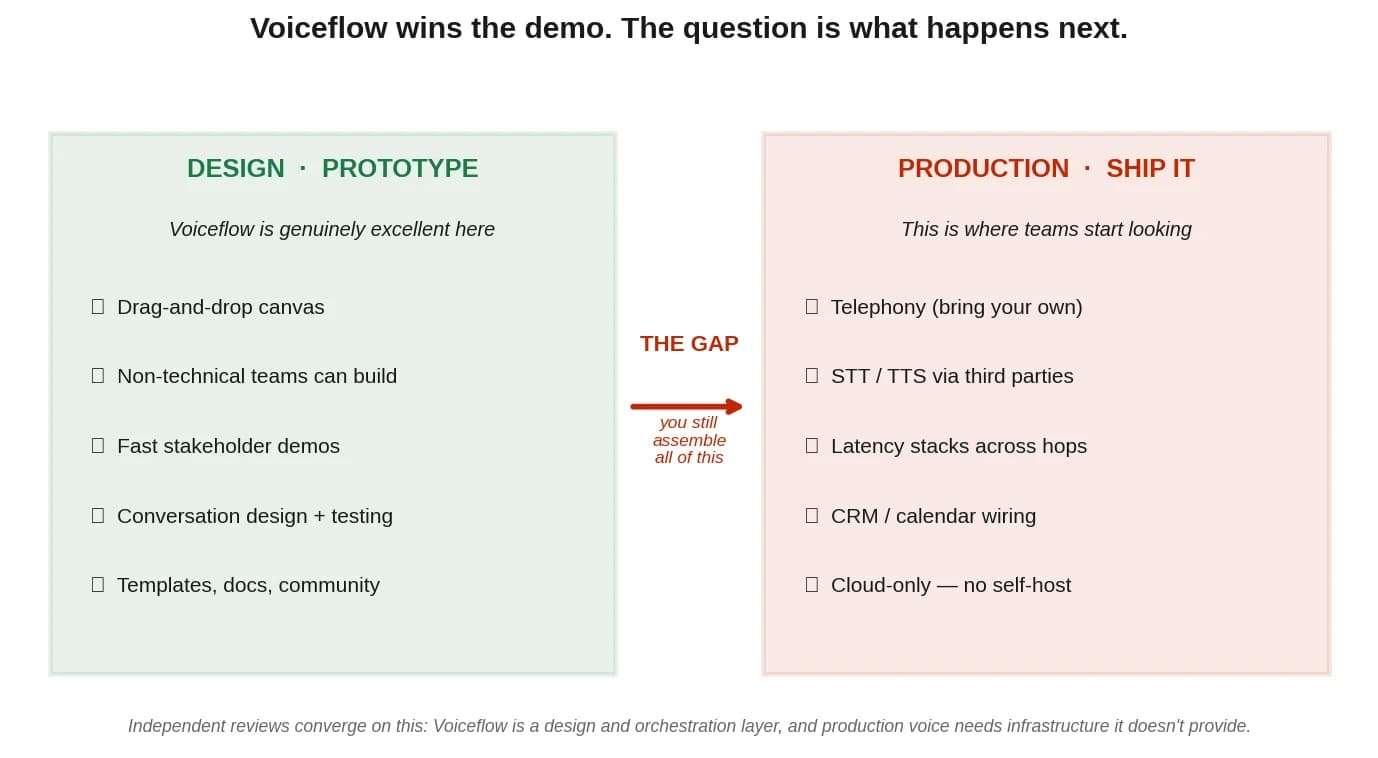
Telephony, speech, and everything else you still have to wire
Here's the concrete version. When you take a Voiceflow agent to a real phone line, the platform doesn't bring the phone line. Independent reviews describe the same pattern: telephony comes from an external provider — Twilio, typically. Speech-to-text comes from a third-party API. Text-to-speech comes from another. CRM and calendar integrations are yours to build. And it's cloud-only, so if you're in a regulated industry that needs self-hosting, that door is closed.
ServiceAgent put it about as bluntly as it can be put: Voiceflow is a builder, not a ready-to-go solution — you still have to integrate the telephony, connect the database, set up the servers. For a service business that just wants the phone answered, that's a project, not a purchase.
‘No-code’ doesn't mean ‘no learning curve’
One more thing reviewers say consistently, and it's worth passing on honestly: no-code is not the same as no learning. Users at a range of skill levels report that understanding how the blocks connect — and how conditions and variables actually behave — took real time. One reviewer, quoted by Quiq, described the interface as visual but said the logic still took a while to click, particularly around conditions and variables on a client project.
That's not a knock on the product. It's a reasonable expectation to set: you are still designing software, and software has a learning curve. But if you chose it expecting to avoid one, that's worth knowing.
Why Hybrid Architectures Feel Slower in Production
You'll see a lot of latency numbers on comparison pages. Be careful with them. Most are self-published by the vendor doing the comparing, often with no methodology and a conveniently flattering self-rating attached. We're not going to add to the pile, so this page makes no numeric latency claim about Voiceflow at all — and none about SuperMIA either. If we won't accept a competitor's unverified number, we don't publish our own.
What we can say is structural, and it's more useful anyway.
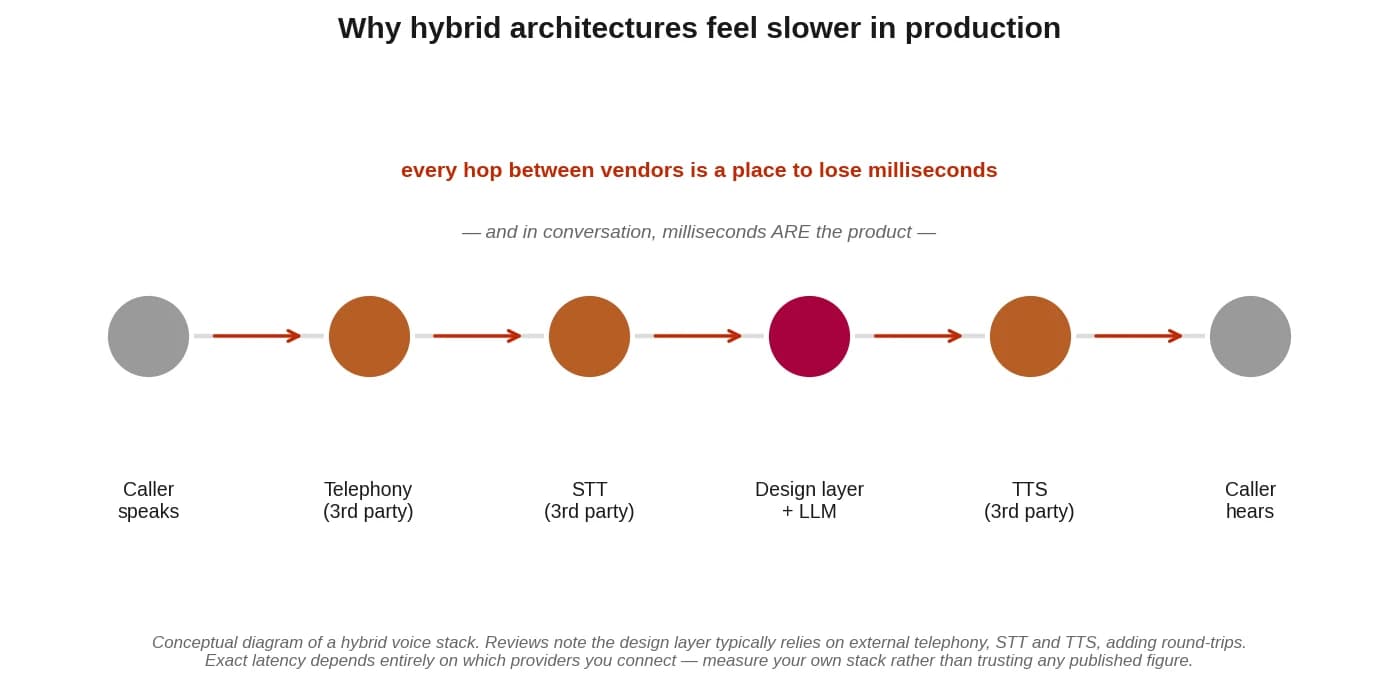
In a live phone conversation, the audio has to travel: caller → telephony → speech-to-text → the reasoning layer → text-to-speech → telephony → caller. When each of those services belongs to a different vendor, each transition is a network round trip. Every hop is a place to lose milliseconds. And in conversation, milliseconds are the product — the gap between an agent that feels natural and one that feels broken is measured in them.
The honest framing: a design layer that calls out to external telephony and external speech services has more hops than a platform that owns that path. That's arithmetic, not a benchmark. It doesn't mean Voiceflow is ‘slow’ — it means the architecture has more places to lose time, and whether that matters depends entirely on which providers you connect and how you configure them. Measure your own stack. Don't trust anyone's published number, including ours — we haven't published one.
The Question Nobody Asks: Design Problem or Production Problem?
Every other page in this SERP assumes the answer is ‘replace Voiceflow.’ But Voiceflow can fail you at two completely different layers — and the right response to each is the opposite of the other.
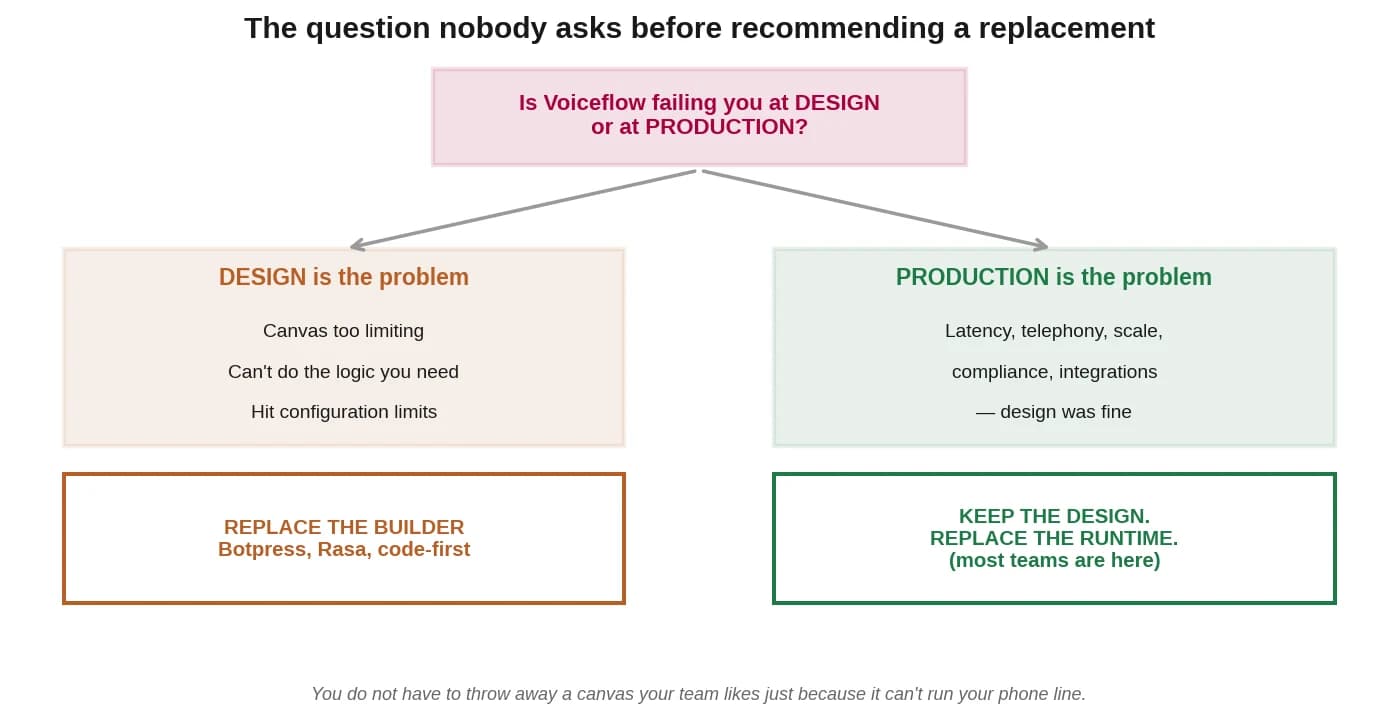
| If this sounds like you… | The broken layer is… | Which means |
|---|---|---|
| ‘I couldn't express the logic I needed’ · ‘I hit configuration limits’ · ‘I was fighting the blocks’ | The canvas (design) | Replace the builder — see below |
| ‘It worked in testing and fell apart on real calls’ · ‘Latency’ · ‘Telephony was a project’ · ‘We can't self-host’ · ‘Integrations are all manual’ | The runtime (production) | Keep the design. Change the runtime. Most teams are here. |
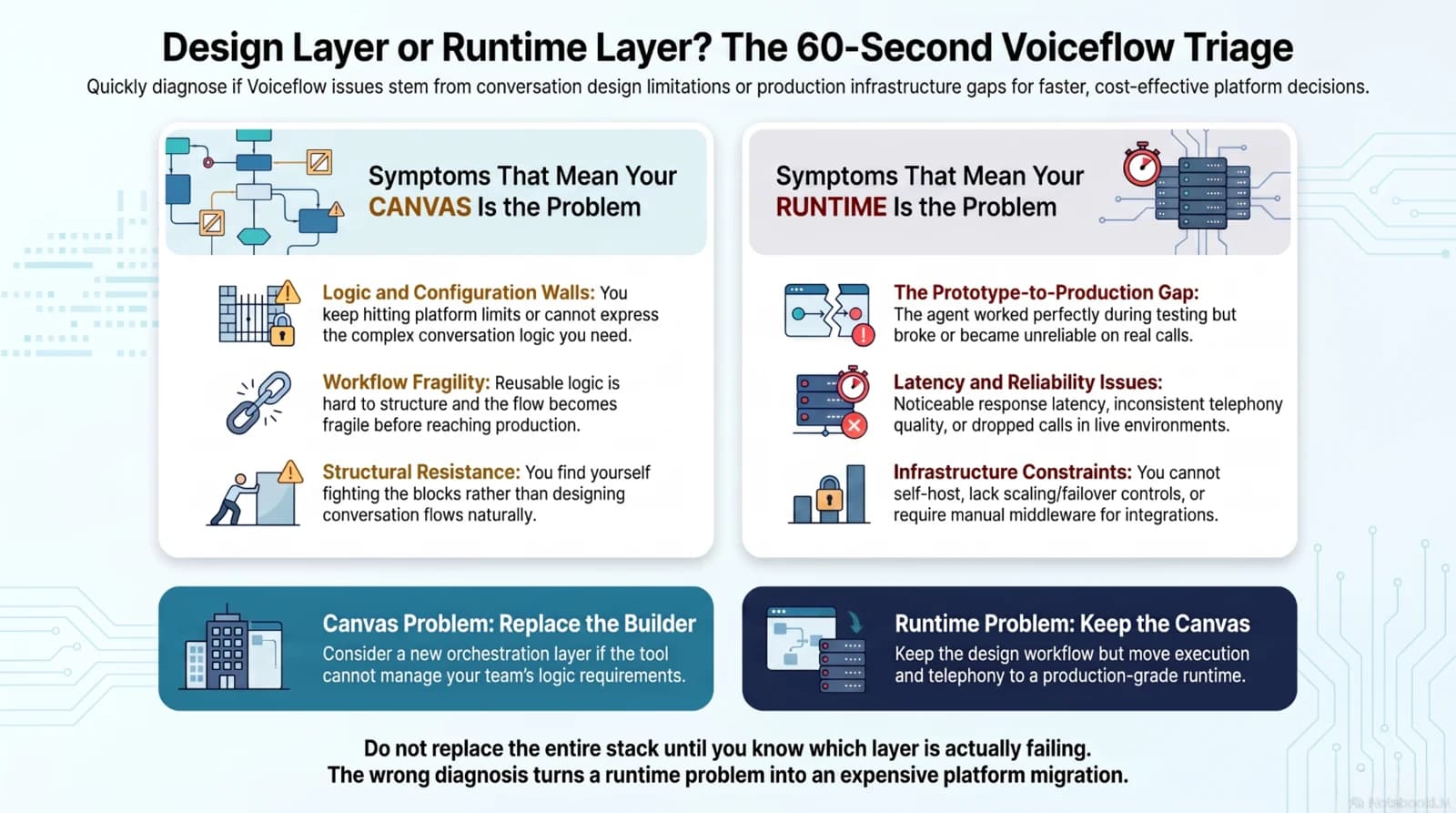
So before you shortlist anything, answer this honestly: did the canvas fail you, or did the deployment?
If the Design Is the Problem - Replace the Builder
If you genuinely hit the canvas's limits, then a new builder is the right answer, and we're not going to pretend SuperMIA is it. Two real options:
Botpress gives you the visual-builder experience you liked, plus full API and developer access, open-source roots, and — usefully — it's LLM-agnostic, so you can swap between OpenAI, Anthropic, Mistral or your own model rather than being tied to one. If your complaint was ‘I love the canvas but I keep hitting a wall’, this is the natural next step.
Rasa is the answer if your blocker is regulatory. It's an established open-source framework built for enterprise deployments, and crucially it supports self-hosting — which Voiceflow, being cloud-only, does not. If your data can't leave your infrastructure, this is where you look.
Both trade some ease-of-use for control, and that's a real trade — you need engineering capacity to spend on it. If you want the wider view of the no-code and low-code builder landscape rather than just the Voiceflow comparison, our guide to no-code AI agent platforms covers the category properly.
If Production Is the Problem - Keep the Design, Change the Runtime
This is where most people actually are, and it's where every other page in this SERP gives bad advice.
Here's the thing no vendor wants to tell you: if your flows were fine and the trouble started at deployment, the canvas is not what failed. Replacing a design tool your team already knows — and has spent weeks learning — will not fix a latency problem, a telephony problem, or a compliance problem. Those are runtime concerns. You'd be throwing away the one part that was working.
A runtime problem needs a runtime answer: a platform where telephony is already connected, where the speech pipeline isn't four vendors deep, where CRM and calendar integrations exist rather than needing to be built, and where compliance is a plan feature rather than a project. You keep your conversation design. You change what runs it.
If you go looking at unbundled voice-infrastructure platforms as the replacement runtime — Vapi and its peers — do the arithmetic first. The advertised per-minute rate on those platforms typically covers orchestration only, with speech, the language model and telephony billed separately at cost. We've written how to work out your real per-minute cost, and it's worth ten minutes before you commit. And for the wide-angle view of the whole voice-platform category, our comparison of 12 voice agent platforms covers the field.
Designed it in Voiceflow, can't ship it?
Book a 15-minute demo and put a real runtime under your existing design.
Book a 15-minute demo →Where SuperMIA Fits (and Where It Doesn't)
Straight version, as always. SuperMIA is NOT a conversation-design canvas. If what you love about Voiceflow is the drag-and-drop flow builder, and what you want is a better drag-and-drop flow builder — we're not that, and Botpress probably is. Go and look at it. We'd rather say so than waste your evaluation.
SuperMIA IS a production runtime. SuperMIA's AI voice agent is a runtime with telephony already in it — the phone line, the speech pipeline, the integrations and the analytics arrive together, and the same platform runs chat agents on the same platform, which matters if you're doing both. You can read SuperMIA's plans and pricing on a public page. The trade-off is genuine: you get less canvas-level control over conversation design than Voiceflow gives you, and if visual flow design is the centre of how your team works, that will feel like a loss. It's the same trade in reverse — and it's why the honest answer to ‘which is better’ is ‘for what?’
Frequently Asked Questions

Harikrishna Patel
Harikrishna Patel is the founder of MIA – My Intelligent Assistant, the AI automation platform built under Botfinity Inc. in Dallas, Texas. With 15+ years in software engineering, AI/ML, and enterprise solution design, he focuses on creating practical, scalable AI tools that help businesses automate support, workflows, and operations through voice and chat.