
Table of Contents
- What is an AI receptionist (and what it isn’t)?
- Sort the category first: software vs platform vs hybrid
- Why the category matters: what a missed call costs
- How we compared these tools
- The 9 best AI receptionist software tools, compared
- At-a-glance comparison table
- How much does an AI receptionist cost?
- How to choose the right one for your business
- Frequently asked questions
What is the best AI receptionist? There is no single best one — it depends which of three categories you need. Complete receptionist software answers calls, books appointments and routes callers out of the box, and is what most searchers actually want. Voice platforms are the developer layer you build on. Hybrid services pair AI with real receptionists for calls that need a person. Sort the category first, then compare inside it.
Book a demo — and see it handle a live call →
Key takeaways
- The search mixes three product categories. Receptionist software, developer voice platforms, and hybrid AI-plus-human services — buying from the wrong one wastes budget.
- Most buyers want category one. Ready-to-use software that answers, books, routes and syncs with your calendar and CRM.
- The stakes are the missed calls. The widely cited figure is that ~80% of voicemail callers simply hang up.
- Match the pricing model, not the sticker price. Flat monthly plus minutes, usage-based, or per-call — each suits a different call pattern.
- Nine tools, listed by fit — not ranked. Every entry says who it’s not for, ours included.
Search “best AI receptionist” and you’ll get a dozen confident lists — and every one of them is quietly comparing apples to power tools. Some rank complete receptionist software alongside raw voice-development platforms, which is like comparing a finished car to a crate of engine parts. Others lump in hybrid AI-plus-human answering services, which are a genuinely different product with different pricing, staffing, and trade-offs. The result is lists that feel comprehensive but leave the reader more confused than when they started.
So this guide does the thing none of the others do: it sorts the categories first, then compares nine receptionist-software tools — the ready-to-use kind that answers calls, books appointments, and syncs with your systems — with honest limitations on every one, including our own.
What is an AI receptionist (and what it isn’t)?
An AI receptionist is software that answers your business’s calls and messages in a natural, conversational voice or chat — and handles the work a good front-desk person would: answering questions, booking appointments from your live calendar, routing calls to the right person, taking messages, and capturing leads. A modern one runs as an AI voice bot on the phone side and as a chat assistant on your website, WhatsApp, or SMS, so it covers every way a customer might try to reach you.
What it isn’t: a magic box that replaces your front desk entirely. The best deployments keep the AI on the high-volume, repetitive contacts it’s excellent at, and route the sensitive, complex, or emotional calls to a person. That split — automation for volume, humans for judgment — is the principle behind every recommendation in this guide.
Sort the category first: software vs platform vs hybrid
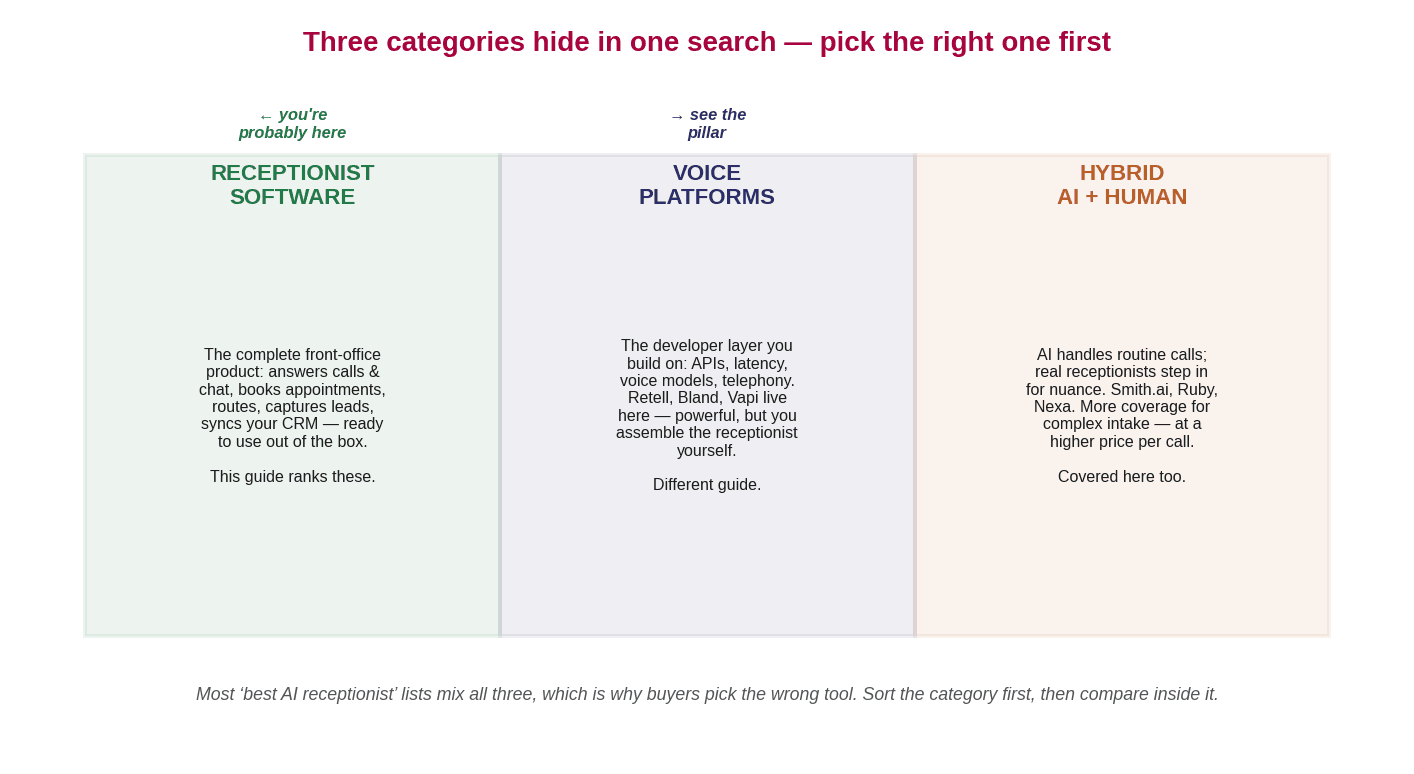
This is the single most useful thing you can do before comparing any tools, and it’s why so many buyers end up unhappy. The “best AI receptionist” results mix three fundamentally different product types, shown in the chart above. Buying from the wrong category is how you end up with a developer tool when you wanted a receptionist, or a receptionist when you wanted a white-label engine.
Category one is receptionist software — the complete, ready-to-use product. It answers calls and chats, books appointments, routes callers, captures leads, and syncs with your CRM or calendar out of the box. This is what most “best AI receptionist” searchers actually want, and it is what we compare in this guide.
Category two is the voice platform — the developer layer. Tools like Retell, Bland, and Vapi give you APIs, voice models, latency control, and telephony infrastructure — but you build the receptionist yourself (or hire someone to). If that is what you need, our guide to AI voice agent platforms covers that layer in depth. They are not ranked here because they are a different product for a different buyer.
Category three is hybrid AI-plus-human — services like Smith.ai, Ruby, and Nexa where AI handles routine calls and real receptionists step in for nuanced or complex interactions. They cost more per call, but they cover the conversations AI still handles poorly. Two of the nine tools in this guide are in this category because the comparison is useful, but they are labelled clearly.
Why the category matters: what a missed call costs
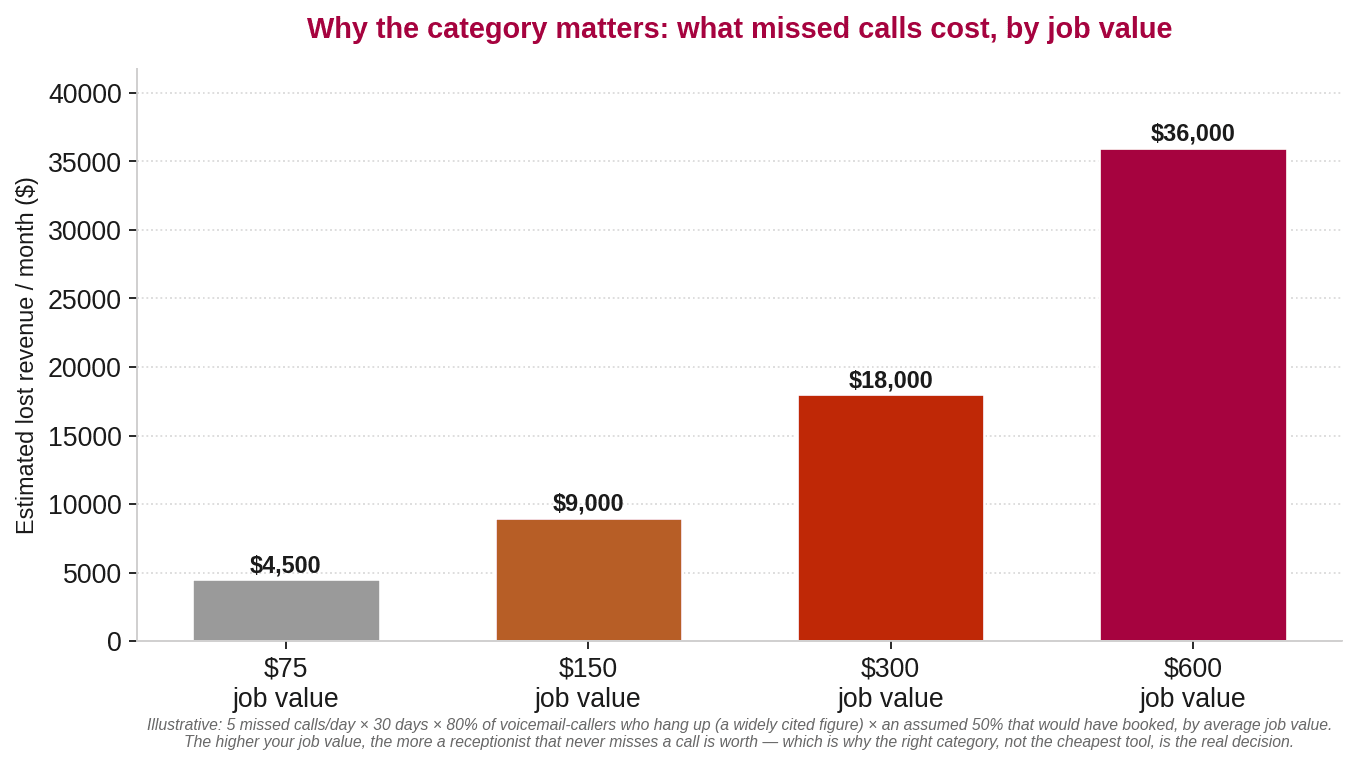
Before the tools, the stakes — because they’re what justify the spend. When a caller can’t reach you and lands in voicemail, most don’t leave a message — the widely cited figure puts it at around 80% of voicemail callers who simply hang up. Those aren’t tyre-kickers; those are people who called because they wanted to book. The chart above shows what that costs illustratively, by average job value.
Illustrative: the missed-call math uses the attributed 80% hang-up figure and an assumed booking rate; your real numbers depend on your call volume, job mix, and average ticket. The point is structural: the cost of missing calls is real and recurring, and it usually dwarfs the cost of any tool on this list. For the dental vertical specifically, our AI receptionist for dental practices guide runs the same math with dental-specific appointment values.
How we compared these tools
We looked at each tool on the same five criteria, and we say plainly who each one is not for — not just who it’s for. The criteria: (1) booking — can it read your calendar and confirm a real slot, or does it just take a message? (2) channels — phone only, or phone plus chat, SMS, WhatsApp? (3) integrations — does it connect to your CRM, calendar, and phone system? (4) pricing model — flat, per-minute, per-call, or per-receptionist? (5) honest limits — where does it fall short, and what should you know before you buy? Vendor-reported stats are labelled as such and not presented as verified findings.
The 9 best AI receptionist software tools, compared
These are listed by category and fit, not ranked one to nine — the right pick depends on your business, not on a leaderboard.
1. Smith.ai — best for hybrid AI-plus-human reception
Smith.ai blends AI with real receptionists, using automated workflows for routine calls while letting human agents step in for nuanced or complex interactions. Who it’s for: businesses where some calls genuinely need a human voice (legal intake, medical triage, complex service requests) and the budget supports per-call pricing. Who it’s not for: high-call-volume businesses where per-call pricing would escalate quickly, or teams that want full automation without human staffing costs.
2. My AI Front Desk — best for an all-in-one SMB front-office bundle
My AI Front Desk packages phone answering, web chat, SMS, CRM, calendar, and follow-ups into one front-office bundle for basic coverage. Who it’s for: small businesses that want one tool to handle everything rather than stitching together multiple products. Who it’s not for: businesses with complex workflows, high call volumes, or sophisticated routing needs — the breadth is wide but the depth in any one area is limited.
3. Goodcall — best for budget-conscious basic call answering
Goodcall focuses on straightforward, affordable call answering for small businesses. Who it’s for: small teams that need reliable answering and simple routing without paying for features they won’t use. Who it’s not for: businesses needing multi-channel coverage, deep CRM integration, or sophisticated booking logic.
4. Rosie AI — best for simple, fast setup
Rosie targets quick, template-based deployment for small offices that want to be live fast. Who it’s for: owner-operators who want a working receptionist in minutes rather than days. Who it’s not for: businesses with complex call flows, multiple locations, or heavy customization needs.
5. ServiceAgent — best for service businesses replacing multiple tools
ServiceAgent bundles the receptionist job — answering, booking, CRM, payments, scheduling — into one platform aimed at service trades. The vendor reports a 75% booking rate and a 77% answer rate for its users. Who it’s for: service businesses (HVAC, plumbing, electrical, cleaning) that want one system for phones, scheduling, and payments. Who it’s not for: non-service verticals, or businesses that already have a CRM and calendar they want to keep.
6. byVoice — best for high inbound and outbound call volume
byVoice is built for businesses with large call volumes and repeatable workflows, handling interruptions and multi-step intake without resetting the conversation. The vendor reports a 95% answer rate. Who it’s for: businesses with high call volume and structured intake workflows. Who it’s not for: small businesses with low call volume where the pricing model may not justify the spend, or those needing strong chat and messaging channels.
7. Ruby — best for a premium human-backed receptionist experience
Ruby is a long-established virtual receptionist service pairing live receptionists with technology. Who it’s for: professional firms that prize a polished, human caller experience and are willing to pay a premium for it. Who it’s not for: budget-sensitive teams or those wanting fully AI-driven automation — Ruby’s strength is the human layer, and the pricing reflects it.
8. Nexa — best for high-touch industries needing human intake
Nexa provides virtual receptionist and answering services with a strong human component and industry specialization. Who it’s for: legal, medical, and home-service businesses where intake calls carry real compliance or relationship weight. Who it’s not for: businesses wanting a pure AI solution or simple answering — Nexa’s value is in the trained human layer, and the cost reflects that.
9. SuperMIA — best for businesses that want voice + chat reception across channels
Full disclosure: this is our product, so here’s the honest version. SuperMIA is a conversational platform that handles the receptionist job across voice and chat — answering calls, responding on your website, WhatsApp, and SMS, booking from your calendar, and routing to your team when a human is needed. If your customers reach you by phone and by message, that combination is the point: one assistant across every channel, rather than a phone-only tool plus a separate chat widget.
Who it’s for: businesses that get customer contacts across both phone and digital channels and want one system for all of them. Who it’s not for: businesses that only need phone answering (a phone-focused tool will be simpler and cheaper), businesses that need the platform layer to build something custom (that’s a developer product, not a receptionist), or industries where our integrations don’t yet cover their practice-management system. For businesses handling restaurant front-desk calls or similar hospitality traffic, the voice channel is particularly strong.
At-a-glance comparison table
Categories, not a ranking. ‘Model’ is how you pay; verify all pricing on the vendor’s site before buying.
| Tool | Category | Channels | Model | Best for |
|---|---|---|---|---|
| Smith.ai | Hybrid AI+human | Phone, chat, SMS | Per-call / per-chat | Complex calls needing a human |
| My AI Front Desk | Software | Phone, chat, SMS | Flat monthly | All-in-one SMB bundle |
| Goodcall | Software | Phone | Flat monthly | Budget basic answering |
| Rosie AI | Software | Phone | Flat + minutes | Fast simple setup |
| ServiceAgent | Software | Phone, SMS | Flat monthly | Service trades (HVAC, plumbing) |
| byVoice | Software | Phone | Usage-based | High call volume |
| Ruby | Hybrid human+tech | Phone, chat | Per-minute | Premium human experience |
| Nexa | Hybrid human+AI | Phone, chat | Per-minute | Legal, medical intake |
| SuperMIA | Software | Phone, chat, WhatsApp, SMS | Flat monthly | Voice + chat across channels |
How much does an AI receptionist cost?
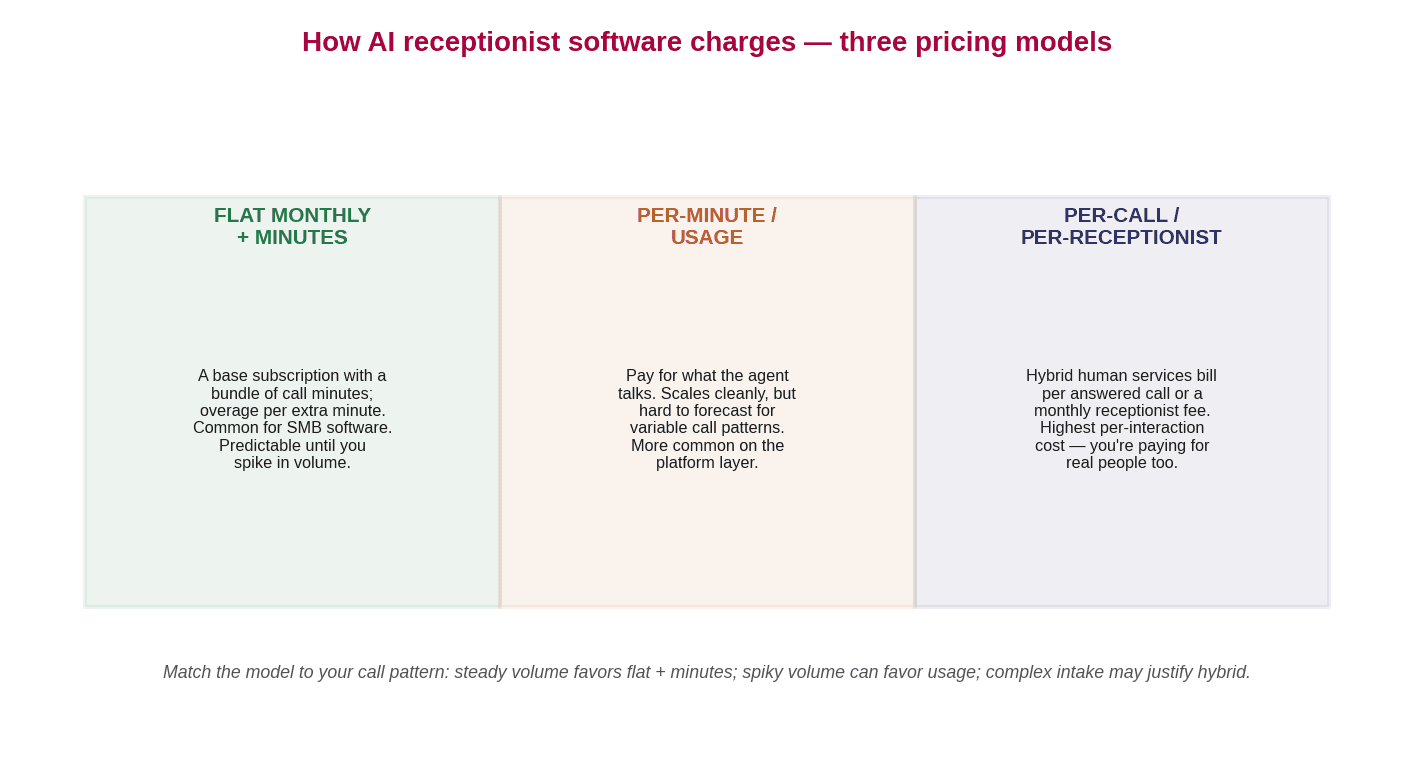
It depends on the category and the pricing model — which is exactly why matching the model to your call pattern matters more than the headline price. The chart above shows the three main shapes. Receptionist software typically starts around $30–$50 per month for basic tiers with included minutes, scaling to $200–$500+ for higher volume and more features. Hybrid services with human receptionists charge per call or per minute and run meaningfully higher. Voice platforms charge per minute of API usage and require development time on top. For AI phone answering service buyers comparing across these models, the total cost depends on your monthly call volume as much as the sticker price.
How to choose the right one for your business
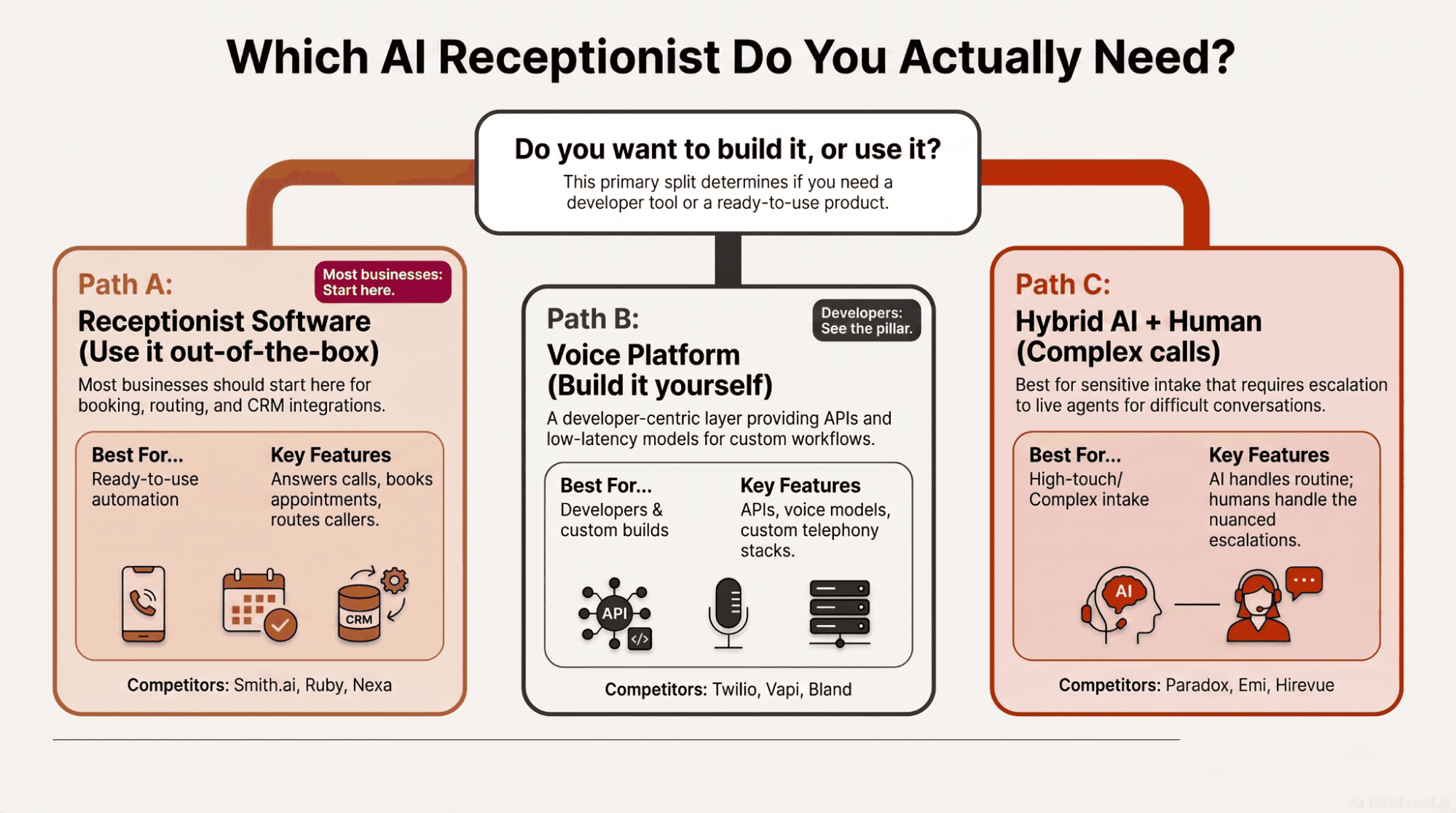
Work it in this order. First, sort the category — do you want to use a receptionist (software), build one (platform), or add humans for complex calls (hybrid)? Second, audit your channels — phone only, or phone plus web, WhatsApp, SMS? Third, check the integrations — does it connect to your calendar, CRM, and phone system? Fourth, match the pricing model to your call pattern — flat monthly if your volume is predictable, per-minute if it spikes. Fifth, test it — hear it handle a real call from your business, not a demo script.
And if the software category is where you land, the fastest way to judge any tool — ours included — is to hear it handle a real call rather than read another comparison.
Book a demo — and see it handle a live call →
Frequently asked questions
What is the best AI receptionist?
There is no single best AI receptionist — it depends on which of three categories you need. Complete receptionist software (answers, books, routes, syncs) is what most searchers want. Voice platforms are for developers building custom solutions. Hybrid services pair AI with human receptionists for calls that need a person. Sort the category first, then compare within it.
What is the difference between an AI receptionist and an AI voice platform?
An AI receptionist is a complete, ready-to-use product that answers calls, books appointments, and routes callers. An AI voice platform is the developer layer beneath it — APIs, voice models, and telephony infrastructure you use to build your own solution. Comparing them directly is like comparing a finished car to an engine block.
How much does an AI receptionist cost?
AI receptionist software is usually a monthly subscription with included call minutes, commonly starting around $30 per month for basic tiers and rising to $200–$500+ for higher volume and features. Hybrid AI-plus-human services charge per call or per minute and cost more. Voice platforms charge per minute of API usage plus development time. Match the pricing model to your call pattern.
Can an AI receptionist book appointments and transfer calls?
Yes, if it integrates with your calendar and phone system. A capable AI receptionist checks live availability to book appointments, and can transfer a call to the right person when the conversation needs a human. Without those integrations, it can only take messages.
Is an AI receptionist better than an answering service?
It depends on your calls. A fully automated AI receptionist answers instantly, 24/7, at a lower per-call cost and is excellent for routine inquiries and bookings. A human-backed answering service handles nuanced, emotional, or complex calls that AI still manages poorly. Many businesses use both — AI for volume, humans for judgment.

Urvil Dhanani
Urvil Dhanani is the AI/ML Lead at SuperMIA, focused on the architecture behind reliable conversational AI - agent design patterns, voice and chat orchestration, and platform evaluation. He writes practical, vendor-neutral guides that help technical teams build and choose AI systems that hold up in production.