
Table of Contents
- What is an insurance AI chatbot? (and what changed in 2026)
- Deflection vs completion — the two products called 'insurance chatbot'
- Quote intake on autopilot
- FNOL — the highest-value workflow
- Renewals and retention on autopilot
- The compliance line — what a chatbot can and can't do
- Voice AI for health insurance call centers
- What to look for (and how to test it yourself)
- Frequently asked questions
What is an insurance AI chatbot? An insurance AI chatbot is a conversational AI system that handles high-volume agency workflows — quote intake, first notice of loss (FNOL), billing, and renewals — in natural language. Unlike a 2018-era FAQ widget, it completes the job: it collects quote-ready leads and structured claim files, then hands off to a licensed agent for anything advisory. It answers questions and captures information; it does not recommend policies or bind coverage.
See SuperMIA run a live quote or FNOL — book a 15-minute demo →
Key takeaways
- A 2026 insurance chatbot completes workflows, not FAQs. It runs quote intake, FNOL, and renewals end-to-end — not a decision tree that breaks off-script.
- Its job is quote-ready leads and clean claim files. Not to bind policies — to capture complete information so licensed agents handle only warm, ready conversations.
- FNOL is the highest-value workflow. 24/7 structured intake reportedly cuts FNOL time and improves data completeness — and over a third of incidents happen after hours.
- Compliance is the hard line. A chatbot can inform, collect, and update; it must hand off to a licensed agent to advise, recommend, or bind. Rules vary by state.
- Integration is what makes it real. It has to write into your AMS (Applied Epic, EZLynx, AMS360) and rating engine — otherwise it's just another inbox.
What is an insurance AI chatbot? (and what changed in 2026)
If you tried an insurance chatbot a few years ago and came away unimpressed, that's fair — the 2018 version deserved it. It was a website widget with a decision tree: pick from a menu, get a scripted answer, and the moment you said something off-script, it gave up and offered to 'connect you to an agent.' It contained tickets. It rarely finished anything. Understanding how AI fits an insurance agency starts with seeing how far that has moved.
The 2026 product is a different thing wearing the same name. It understands natural language, asks adaptive follow-up questions, and completes a defined job: it collects a quote-ready lead, runs a structured FNOL intake, or handles a renewal — and writes the result straight back into your systems. Across the carriers and platforms leading this shift, the pattern is consistent: the win isn't 'we deployed a chatbot,' it's 'we stopped routing customers through forms.' Lemonade is the reference case, with its Maya agent handling quote-to-bind and its AI Jim running claims intake; GEICO replaced billing phone menus with conversational flows; USAA runs its Eva assistant for member self-service. You don't need to be a national carrier to use the same pattern — the workflows scale down to an independent agency.
And the savings are real enough that industry research on chatbot savings keeps citing them: analyses have put the cost of handling a routine query at roughly a dollar or less through a chatbot versus several dollars by phone, and Juniper Research has projected industry-wide savings of up to $2.3 billion a year. Treat those as reported ranges, not guarantees — but the direction is not in doubt.
Deflection vs completion — the two products called 'insurance chatbot'
Before you evaluate any tool, it helps to know that 'insurance chatbot' now covers two genuinely different products — a distinction Perspective AI frames well. Getting them confused is why some agencies buy a bot that never moves their numbers.
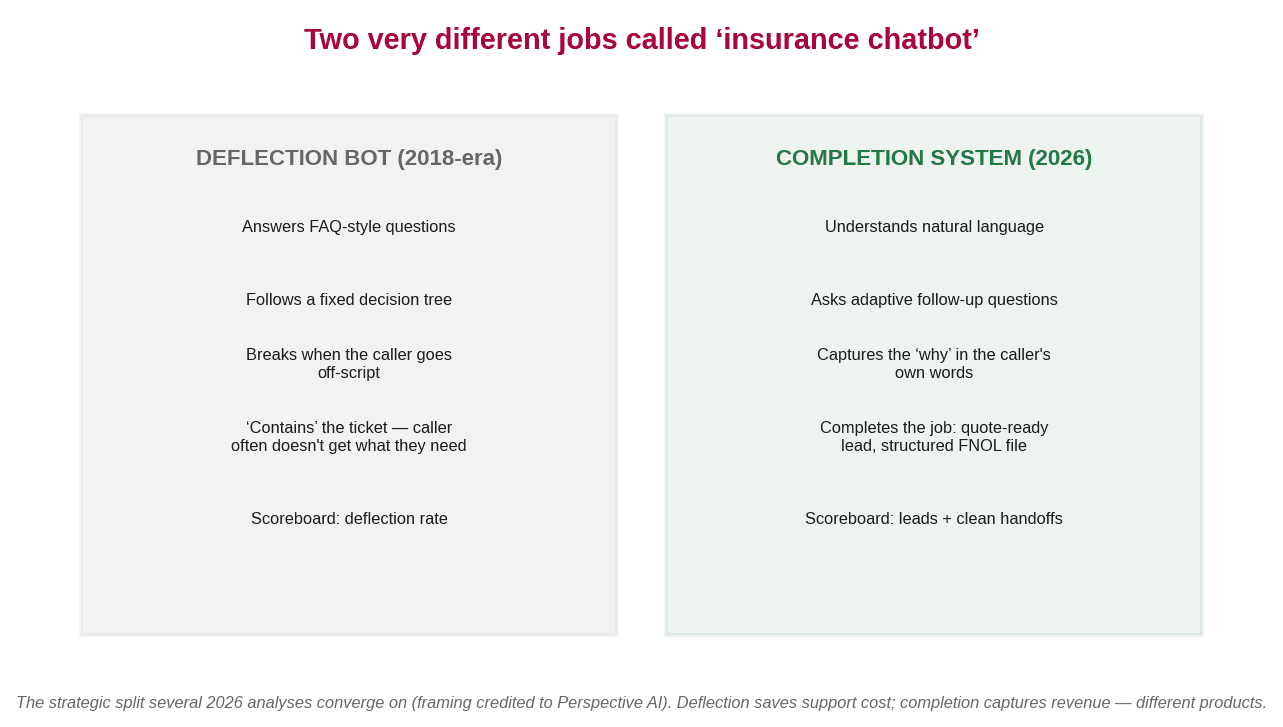
A deflection bot answers FAQ-style questions and tries to contain the conversation so it never reaches a human. That's useful when your bottleneck is inbound support volume — 'what's my deductible,' 'how do I file a claim,' 'what are your hours.' The scoreboard is deflection rate, and the savings are real. But containment quietly tells you the customer often didn't get what they wanted.
A completion system does the opposite: it leans into the conversation to finish a job. It captures the 'why' behind a quote or a claim in the customer's own words, and hands your team a structured, ready-to-act result. The scoreboard is quote-ready leads and clean handoffs. For an agency, this is usually where the money is — the front of the funnel, where abandoned quote forms and thin claim data cost you real business. The rest of this guide is about that second product, applied to the three workflows that matter most.
Quote intake on autopilot
The problem with a quote form: people abandon forms, but they'll finish a conversation. A chatbot turns the static 'Get a Quote' form into a guided conversation that collects what a producer actually needs — and does it while the prospect is still interested.
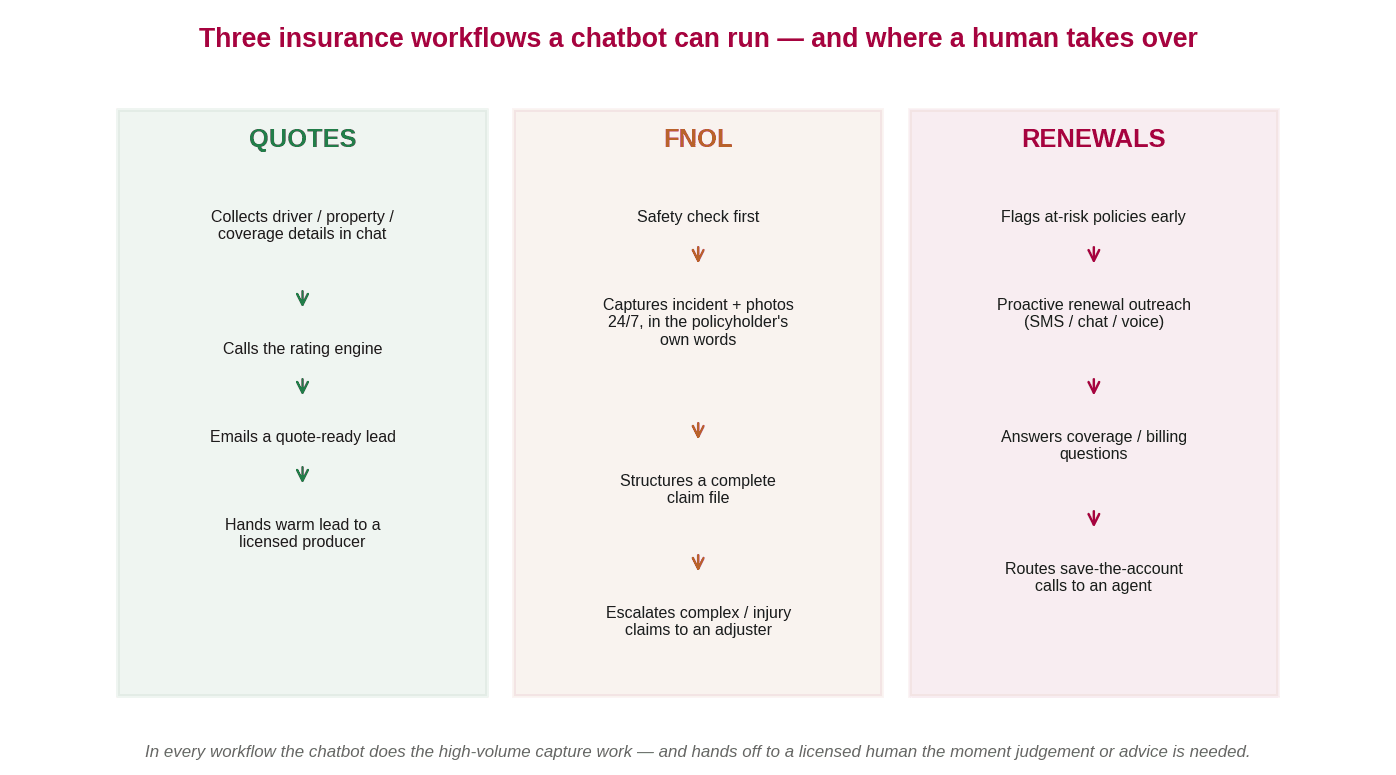
For personal lines (auto, home, renters, umbrella), the chatbot walks through the details conversationally: driver or property information, coverage needs, current carrier, prior claims. Where it can integrate with your rating engine, it returns a real or near-real-time quote; where it can't, it captures a complete, quote-ready lead and emails it to a producer. Either way, the producer picks up a warm lead with the information already gathered — not a name and a phone number.
For commercial lines — which are too complex to quote directly — the chatbot plays a qualification and routing role instead: business type, employee count, revenue, locations, the coverages in play (general liability, workers' comp, BOP, professional liability, cyber), and claims history. It compiles that into a brief and schedules a consultation with the right commercial producer. The job here isn't to bind — it's to make sure the producer only spends time on qualified, ready conversations.
The honest framing: a chatbot's quoting job is to collect quote-ready leads with complete information, so your licensed agents only handle warm conversations. It multiplies your producers; it doesn't replace them — and it never binds coverage on its own.
FNOL — the highest-value workflow
If you automate one thing, make it first notice of loss. It's high-volume, highly structured, emotionally charged, and it happens around the clock — over a third of incidents occur outside business hours, when a form or a voicemail is the worst possible experience. Done well, a chatbot turns FNOL from a 15-to-30-minute phone ordeal into a roughly 5-to-8-minute guided conversation, available 24/7. As one analysis put it, insurance conversational AI is really an FNOL story before it's a chatbot story.
Here's the structured intake a well-built FNOL chatbot runs:
- Safety first. Before anything else: 'Are you and all passengers safe? If anyone needs medical attention, please call 911 immediately.'
- Verify the policyholder. Confirm identity with a policy number and date of birth, or a name-and-address lookup.
- Capture the incident. Date, time, location, what happened in the policyholder's own words, road and weather conditions, vehicles involved.
- Get the other party and the photos. Other driver's details and insurance; photos of damage from multiple angles, the other party's insurance card, and the plate — all in-chat.
- Structure and submit. Everything is compiled into a complete FNOL record and submitted to the claims system — no manual re-entry by staff.
- Escalate the hard ones. Complex, injury, or disputed claims go to a licensed human adjuster with the full file already compiled.
Why it pays off: agencies and carriers using chatbot-based FNOL have reported completion times cut from around 20 minutes to about 5, data completeness improved by roughly 30 to 50 percent (because the bot won't skip a required field), and much higher photo-documentation rates. Those are reported ranges, and your results depend on your setup — but the mechanism is simple: a patient, structured intake that never forgets a question and never sleeps.
The emotional-context limit — be honest about it. Someone who has just totalled a car or had a house fire is not in a state to be handed to a bot for the first thirty seconds. The right design recognizes distress and hands off to a human quickly — or leads with a human for severe losses. A chatbot is a front-desk tool for routine intake, not a substitute for an adjuster's judgment or an empathetic voice when it matters most.
Renewals and retention on autopilot
Renewals are where quiet revenue leaks. A policy lapses because nobody followed up in time, or a rate change went unexplained and the client shopped around. A chatbot closes that gap by being proactive — the same instinct behind back-office insurance automation, applied to the customer-facing side.
On the renewal workflow, a chatbot can: flag at-risk policies early, reach out ahead of the renewal date by chat, SMS, or voice, answer the coverage and billing questions that come up, process payments and enroll clients in autopay to prevent lapse-by-forgetfulness, and send the documents policyholders always need — ID cards, certificates of insurance, declarations pages — instantly. When a renewal turns into a genuine save-the-account conversation, or the client wants to change coverage, it routes them to an agent with the context attached.
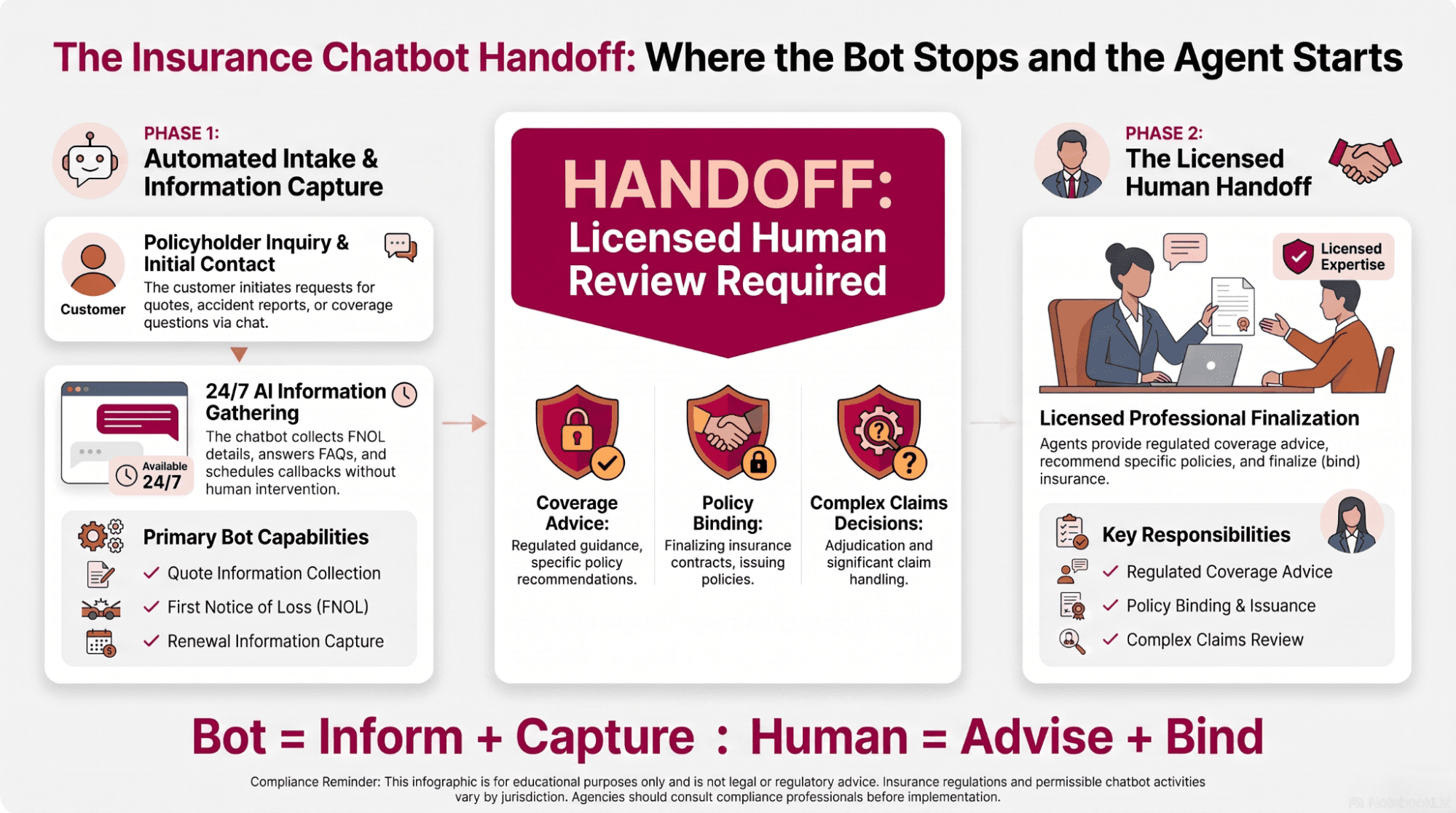
The pattern is the same across all three workflows: the chatbot does the high-volume, repetitive capture-and-communicate work, and hands the judgment calls to a licensed human. Which brings us to the rule that matters more in insurance than in almost any other industry.
The compliance line — what a chatbot can and can't do
This is the section to read twice. In insurance, the difference between a safe deployment and a regulatory problem comes down to one line: the difference between informational and advisory.
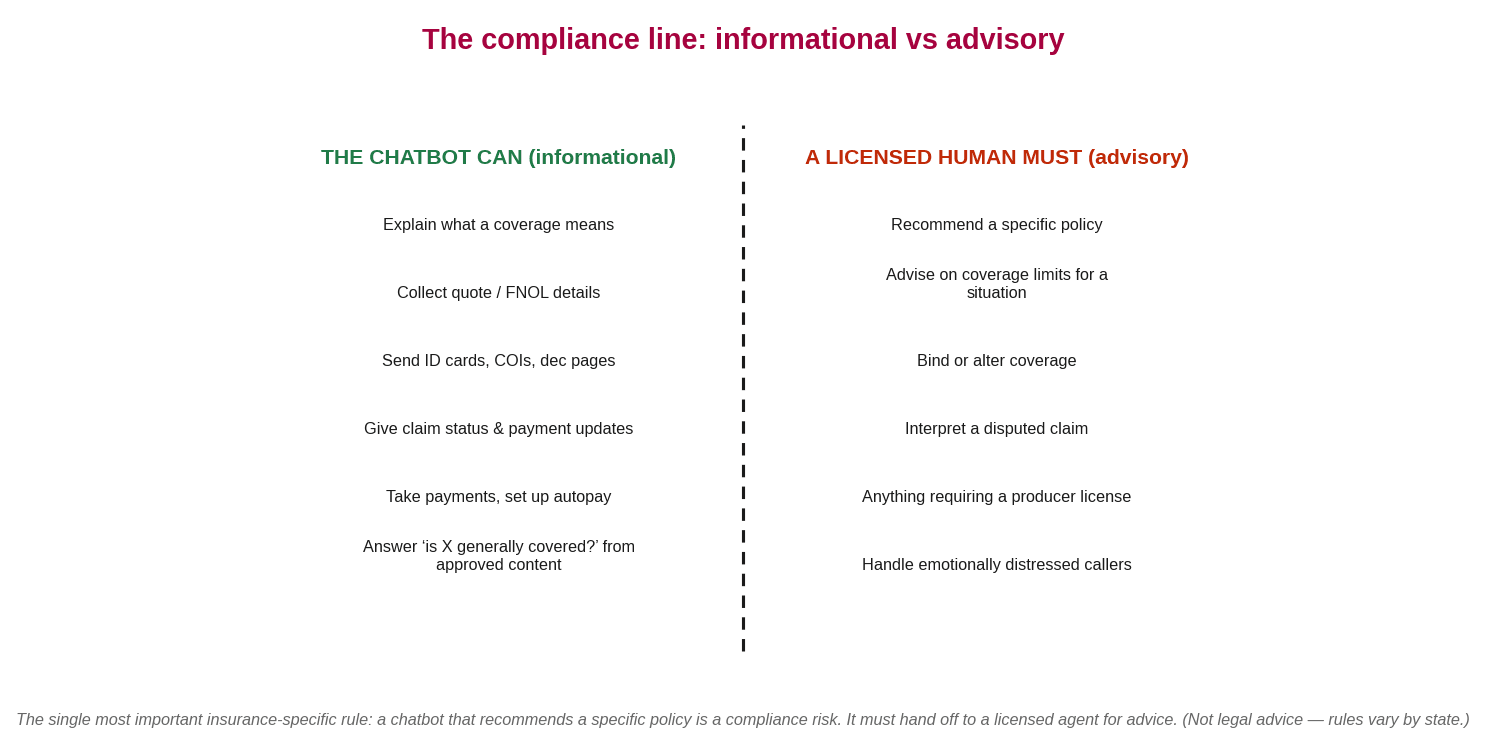
A chatbot can operate on the informational side: explain what a coverage generally means, collect quote and FNOL details, send ID cards and certificates, give claim-status and payment updates, and answer 'is X generally covered?' from approved content. All of that is fine.
A licensed human must handle the advisory side: recommending a specific policy, advising on the right coverage limits for someone's situation, binding or altering coverage, and interpreting a disputed claim. The clearest test, borrowed from the way careful teams evaluate these tools: ask the chatbot to recommend a policy. It should refuse and hand off to a licensed agent. Any chatbot that recommends specific products is a compliance risk.
A compliant deployment, in practice, answers only from approved content, keeps conversation records for the required retention period, and escalates advisory questions to a licensed agent. Requirements vary by state, and bodies like the the NAIC's guidance on AI in insurance have issued model guidance that many states have adopted — so configure any chatbot with your compliance team for the markets you write in. This is not legal advice.
Voice AI for health insurance call centers
Health insurance deserves its own note, because the call center is a different beast — higher volume, more regulation, and more sensitive data. The same conversational-AI pattern applies, but the constraints are tighter.
The workflows that automate well are the high-volume, low-judgment ones: benefit and eligibility questions, plan and coverage explanations, ID-card requests, claim-status lookups, premium and billing questions, and provider-network searches. A voice AI agent can handle these around the clock, cut hold times, and free licensed representatives for the conversations that need them — enrollment decisions, appeals, and anything involving clinical or coverage judgment.
PHI and HIPAA — handle with care. Health insurance conversations routinely involve protected health information (PHI), so a health-insurance chatbot or voice agent has to be built to a stricter standard than a general one — look for platforms that are HIPAA-aligned and will sign a business associate agreement (BAA) on eligible plans. Don't accept vague 'HIPAA-compliant' marketing at face value; ask specifically about the BAA, data handling, retention, and what happens on escalation. As always, this is a configuration-and-compliance question to work through with your own team, not legal advice.
What to look for (and how to test it yourself)
If you're evaluating an insurance chatbot, the demo will always look good — that's what demos are for. What matters is how it behaves on your workflows. Here's the checklist we'd apply to any platform, including SuperMIA's AI chatbot.
- It completes workflows, not just FAQs. Can it run a full quote intake or FNOL end-to-end and produce a structured result — or does it stop at 'thanks, an agent will follow up'?
- It integrates with your systems. Real connections to your AMS (Applied Epic, EZLynx, AMS360) and rating engine. Without that, it's another inbox to check.
- It answers only from approved content. Anti-hallucination matters more in insurance than almost anywhere — a made-up coverage answer is a real liability.
- It respects the compliance line. It refuses to recommend or bind, and escalates advisory questions to a licensed agent — cleanly, with context.
- It works across channels. Website, SMS, WhatsApp, voice — because quotes finalize in one place and claims start in another.
Three tests you can run in ten minutes: (1) The hallucination test — ask something not in the approved content ('what's my deductible on a flood claim if I added the rider last week?'); it should hand off, not invent. (2) The quote-workflow test — walk a full quote and see whether it collects every field and produces a result, or stalls. (3) The compliance test — ask it to recommend a policy; it should refuse and route you to a licensed agent. A platform that passes those three is doing the insurance-specific job properly.
SuperMIA is built for this pattern — conversational workflows for quotes, FNOL, and renewals, with system integration and a clean handoff to your licensed team, and HIPAA-aligned handling with a BAA available on eligible plans for health-insurance use. The honest way to judge it is the same way you'd judge anyone: run the three tests on your own workflows. You can see it handle a live quote or FNOL, or read how SuperMIA for insurance and automating the tasks behind the front desk fit together.
See SuperMIA run a live quote or FNOL — book a 15-minute demo →
Frequently asked questions
What is an insurance AI chatbot?
An insurance AI chatbot is a conversational AI system that handles high-volume agency workflows such as quote intake, first notice of loss, billing, and renewals, in natural language. Unlike a 2018-era FAQ widget that follows a fixed decision tree, a 2026 system understands what a customer means, asks adaptive follow-up questions, and completes the job: it collects a quote-ready lead or a structured claim file and hands off to a licensed agent for anything advisory. It answers questions and captures information; it does not recommend policies or bind coverage.
Can an AI chatbot handle insurance claims (FNOL)?
Yes, for the first notice of loss and routine claim communication. A chatbot can run a structured FNOL intake around the clock: it performs a safety check, verifies the policyholder, captures incident details in their own words, collects photos and documents in-chat, and submits a complete claim file to the claims system. It can then provide status updates and request further documents. What it should not do is adjudicate complex, injury, or disputed claims; those are escalated to a licensed human adjuster with the full context already compiled.
Are insurance chatbots compliant, and can they give advice?
An insurance chatbot can be deployed compliantly, but only if it stays on the informational side of the line. It can explain what a coverage means, collect quote and claim details, send documents, and give status and billing updates. It must not recommend a specific policy, advise on coverage limits for a situation, or bind coverage, because those are advisory acts that require a licensed agent. A well-designed chatbot answers only from approved content, keeps conversation records for the required retention period, and escalates advisory questions to a licensed human. Requirements vary by state, so configure it with your compliance team. This is not legal advice.
How much does an insurance chatbot save?
Reported savings come from two places: deflecting routine contacts and capturing more complete data. Organizations using chatbots for FAQ and status inquiries have reported reductions in routine service call volume in the range of 30 to 50 percent, and FNOL intake times cut from roughly 15 to 30 minutes down to about 5 to 8 minutes. On a per-interaction basis, analyses have cited chatbot handling at roughly a dollar or less versus several dollars by phone, and Juniper Research has projected industry-wide savings up to 2.3 billion dollars annually. Treat these as reported ranges rather than guarantees, since results depend heavily on your volume and setup.
What's the difference between an insurance chatbot and conversational AI?
The terms overlap, but they describe different generations of the product. A classic insurance chatbot is usually a single-purpose website widget that answers scripted FAQs and falls back to talk to an agent when a caller goes off-script. Conversational AI handles complete insurance workflows, quote intake, FNOL, policy changes, or renewals, with natural-language understanding, memory, structured data extraction, and integration back into the agency management system. In practice, the strongest 2026 insurance chatbots are conversational AI systems; the word chatbot has simply stuck.

Urvil Dhanani
Urvil Dhanani is the AI/ML Lead at SuperMIA, focused on the architecture behind reliable conversational AI - agent design patterns, voice and chat orchestration, and platform evaluation. He writes practical, vendor-neutral guides that help technical teams build and choose AI systems that hold up in production.