

Table of Contents
The best AI workflow automation tools in 2026 are Zapier (easiest, non-technical teams), Make (high-volume visual ops), n8n (technical teams, self-hostable), Microsoft Power Automate (Microsoft shops), Workato and UiPath (large enterprise), and Lindy (AI-agent-first). The right tool depends on your team's technical skill, workflow complexity, and budget. Compare on integrations, scalability, governance, and total cost of ownership - not just the sticker price.
Key takeaways
- No single best tool - pick by team type. Each team profile has a different winner.
- Zapier for easy, n8n for control. The classic trade: setup speed vs power and cost.
- Watch the pricing model. Per-task can overtake flat or self-host at high volume.
- AI ≠ RPA ≠ traditional automation. AI interprets and adapts; RPA clicks; traditional just moves data.
- Self-host for control, managed for speed. No DevOps? A managed platform ships faster.
What is an AI workflow automation tool?
An AI workflow automation tool connects your apps and data, then uses AI to interpret, decide, and act across multi-step processes - not just move data by fixed rules. Where traditional automation breaks when an input changes, an AI tool can read context, handle edge cases, and adapt. That's the line between "if this, then that" and a workflow that thinks.
The category is growing quickly as teams move beyond simple triggers - see automation market data.
AI automation vs traditional automation vs RPA
Traditional automation moves data by fixed rules; RPA mimics human clicks; AI automation interprets, decides, and adapts. Most modern tools blend all three.
| Type | How it works | Best at |
|---|---|---|
| Traditional automation | Fixed if-this-then-that rules | Simple, predictable data moves |
| RPA | Mimics clicks on existing UIs | Legacy systems with no API |
| AI automation | Interprets, decides, adapts (often LLM-powered) | Variable, unstructured, edge-case-heavy work |
Tools that lean fully into the AI side are increasingly called agentic. If that's your goal, see our guide to a no-code agentic AI platform.
The 7 best AI workflow automation tools (compared)
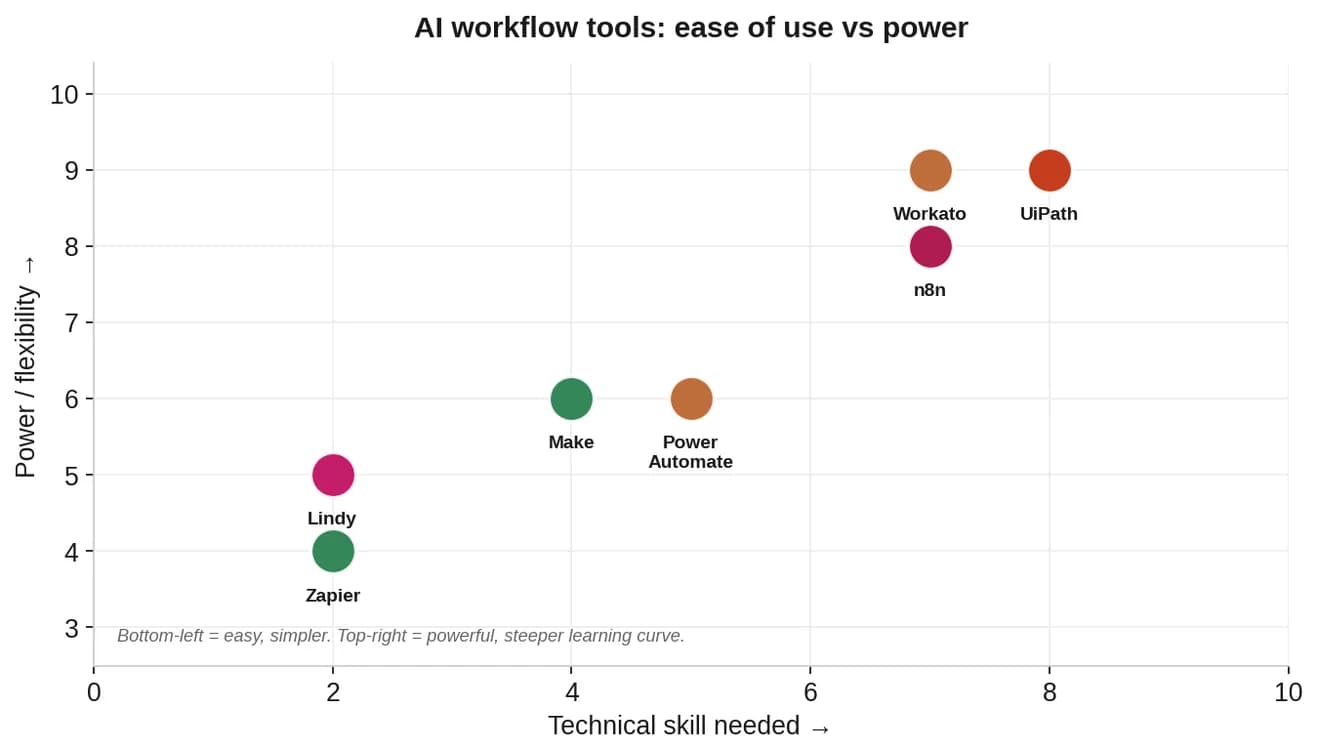
The best AI workflow automation tools are Zapier, Make, n8n, Power Automate, Workato, UiPath, and Lindy. Here's the quick comparison, then the detail.
| Tool | Best for | Skill needed | Pricing model |
|---|---|---|---|
| Zapier | Non-technical teams, SMBs | Low | Per-task / tiered |
| Make | High-volume visual ops | Low–medium | Per-operation / tiered |
| n8n | Technical teams, self-host | Medium–high | Self-host free / cloud tiered |
| Power Automate | Microsoft 365 shops | Medium | Per-user / per-flow |
| Workato | Enterprise integration | High | Enterprise (quote) |
| UiPath | RPA at scale | High | Enterprise (quote) |
| Lindy | AI-agent-first automation | Low | Tiered |
Zapier - best for non-technical teams
The easiest entry point: 8,000+ app integrations, a drag-and-drop builder, and AI steps. Ideal for SMBs and non-technical users automating everyday SaaS tasks. Watch per-task pricing as volume grows. See the tool's official site for current tiers.
Make - best for high-volume visual ops
A visual builder with deterministic routing and strong debugging - better than Zapier for complex, multi-branch, high-volume workflows. Slightly steeper learning curve, more power per dollar at volume. Check the official Make site for pricing.
n8n - best for technical teams (self-hostable)
n8n is source-available and self-hostable, with deep flexibility and strong AI/LLM support. The go-to for technical teams that want control and lower cost at scale. It's also the centerpiece of our best open-source workflow automation tools guide.
Microsoft Power Automate - best for Microsoft shops
If you live in Microsoft 365, Dynamics, and Azure, Power Automate integrates natively and adds AI Builder and RPA. Most valuable inside the Microsoft ecosystem; steeper if you're not.
Workato - best for enterprise integration
An enterprise iPaaS with deep integration, governance, and orchestration across hundreds of systems. Powerful and scalable, priced and scoped for large organizations.
UiPath - best for RPA at scale
The RPA leader, now AI-infused. Best for automating repetitive, UI-driven tasks across legacy systems at enterprise scale. Significant setup investment.
Lindy - best for AI-agent-first automation
Represents the agentic wave: describe what you want in plain English and it builds an autonomous agent. Best for teams that want AI-first automation without wiring every node by hand.
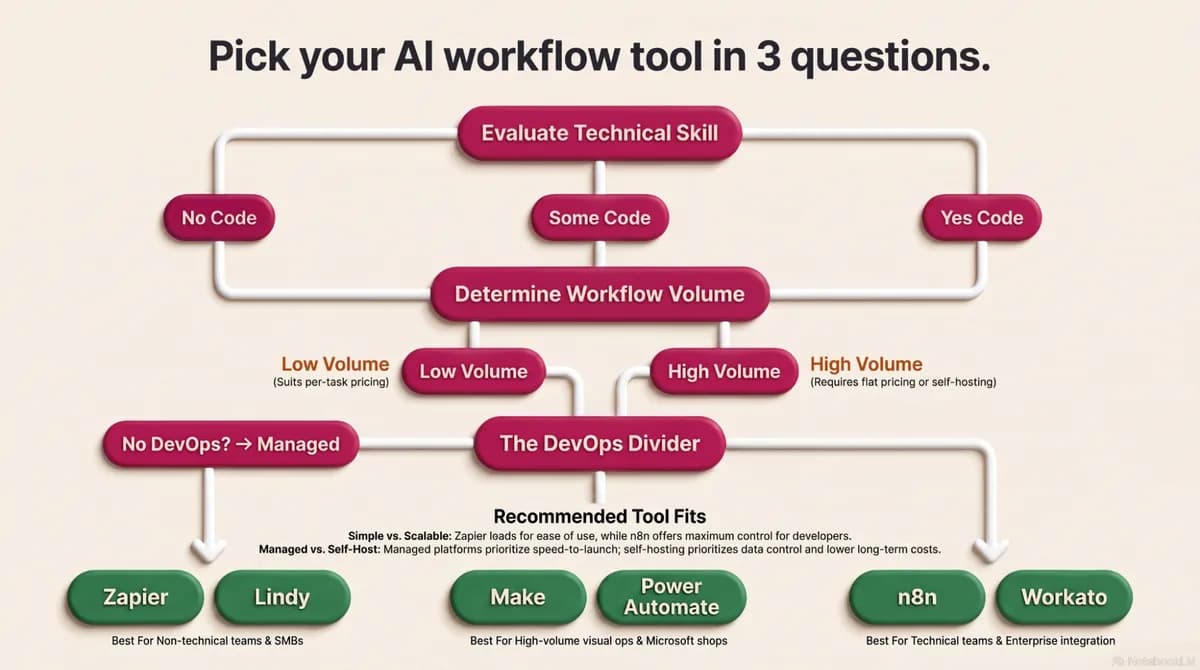
How to choose the right tool for your team
Choose by team type and workflow complexity, not by which tool has the loudest marketing. Start from who's building the workflows.
- Non-technical / SMB: Zapier or Lindy - fast, no code.
- Ops teams, high volume: Make - visual power and debugging.
- Developer / technical: n8n - control, self-host, lower cost at scale.
- Microsoft shops: Power Automate - native ecosystem fit.
- Large enterprise: Workato or UiPath - governance and scale, with integration challenges to plan for early.
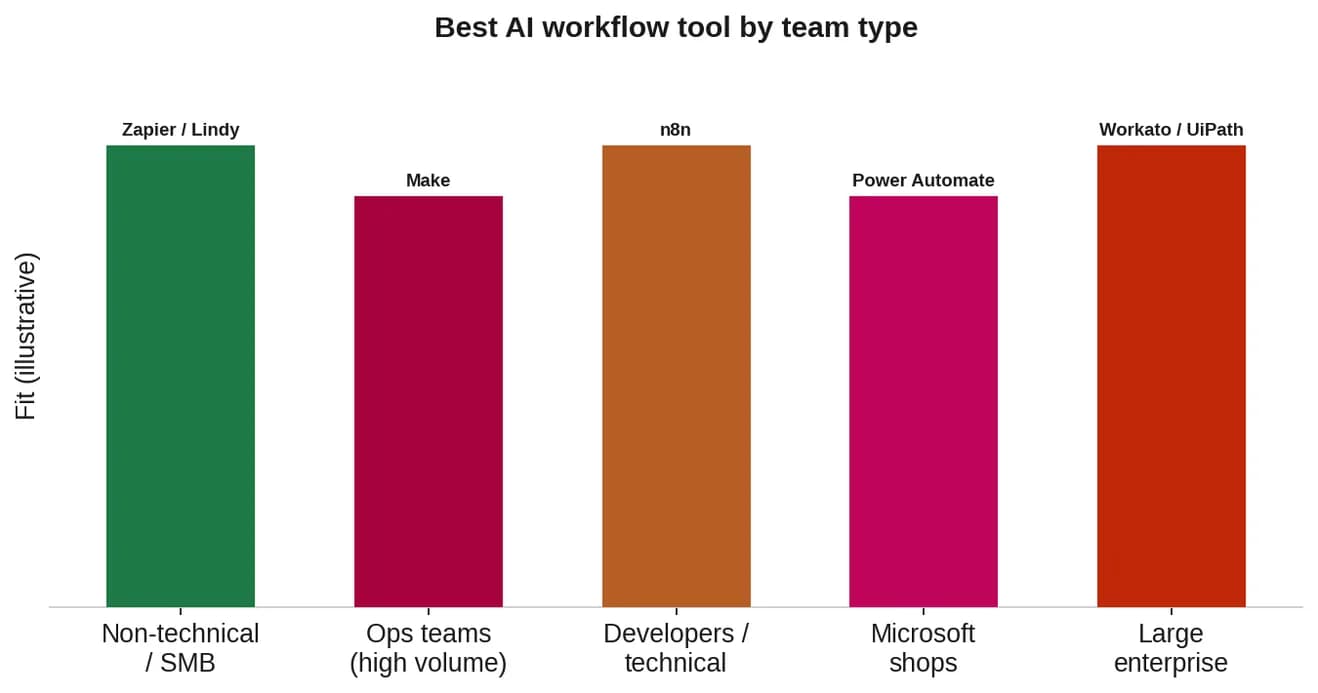
Cross-check your shortlist against independent analyst and review-platform ratings before you commit.
How much do AI workflow automation tools cost?
Pricing ranges from free tiers and ~$20/month entry plans to thousands per month for enterprise platforms - but the pricing model matters more than the headline price. Per-task pricing looks cheap at low volume and gets expensive fast.
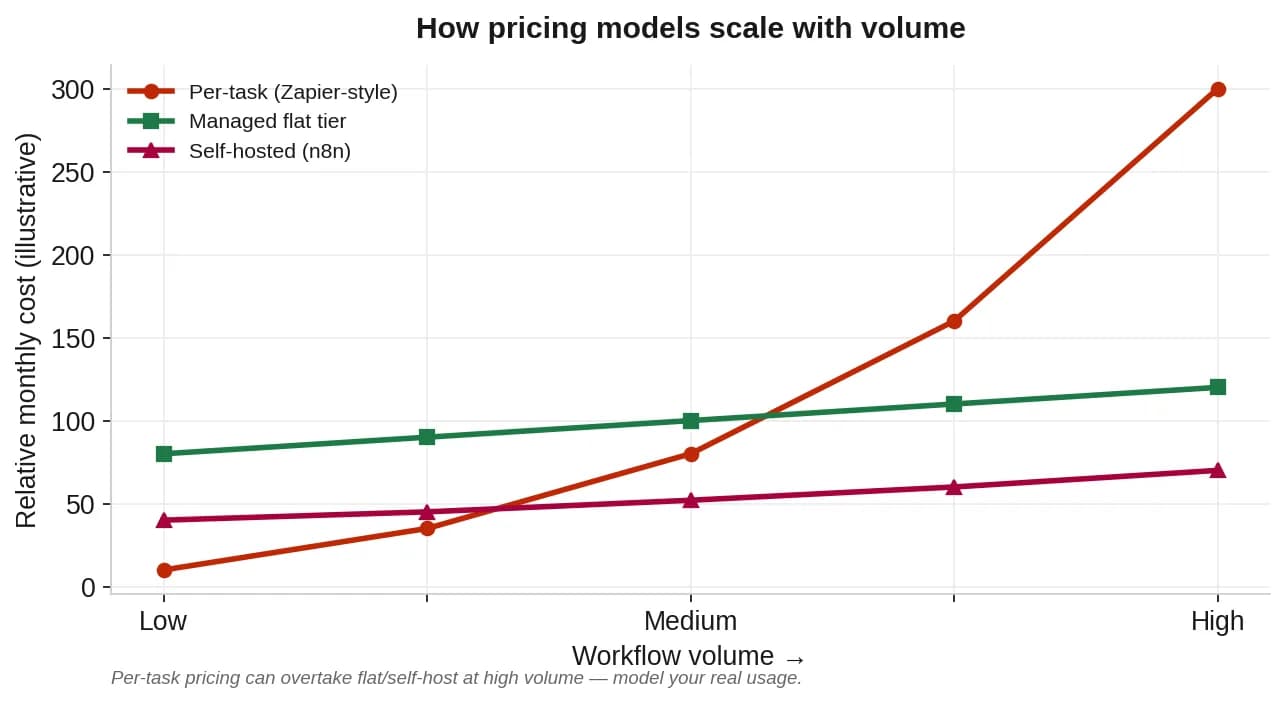
Model your real volume across three years, including integration and maintenance - the same way you'd model automation ROI. At high volume, flat-tier or self-hosted often wins.
⚠️ Tool pricing and features change frequently. Verify current tiers on each vendor's site before deciding; the charts above are illustrative.
When a managed platform makes more sense
Choose a managed platform when speed-to-launch matters more than infrastructure control. Point tools and self-hosting both leave you assembling and maintaining the stack. A managed platform runs it for you.
If your team wants the automation outcomes without managing servers, security, and upgrades, SuperMIA is a managed AI workflow automation platform - a no-code + pro-code hybrid that connects LLMs, APIs, and databases so you can run automations without managing the stack. It's the same platform behind our AI chat agent, so automation and conversation share one engine. It isn't on the list above because this is a vendor-neutral comparison - but if managed is your answer, it's worth a look.
Frequently asked questions
What are the best AI workflow automation tools?
The best AI workflow automation tools in 2026 are Zapier for non-technical teams, Make for high-volume visual operations, n8n for technical teams that want to self-host, Microsoft Power Automate for Microsoft-centric organizations, Workato and UiPath for large enterprises, and Lindy for AI-agent-first automation. The right choice depends on your team's technical skill, workflow complexity, and budget.
What is the best AI workflow automation tool for small business?
For small businesses, Zapier is usually the best starting point because it is easy to set up, needs no coding, and connects to thousands of apps. Make is a strong alternative for more complex visual workflows, and n8n suits small teams with technical skills who want lower cost and self-hosting.
What is the difference between AI automation, traditional automation, and RPA?
Traditional automation moves data between apps using fixed rules. RPA (robotic process automation) mimics human clicks to operate software interfaces. AI automation goes further: it interprets unstructured input, makes decisions, and adapts to situations the rules did not anticipate, often using language models inside the workflow.
How much do AI workflow automation tools cost?
Pricing ranges from free tiers and around $20 per month for entry plans to thousands per month for enterprise platforms. The pricing model matters more than the headline price: per-task pricing can rise sharply at high volume, while flat-tier or self-hosted options scale more predictably. Always model your real workflow volume.
Should I self-host or use a managed workflow automation platform?
Self-host an open-source tool if you want full control and have the DevOps capacity to run it. Use a managed platform if you want to ship workflows quickly without maintaining infrastructure, security, and upgrades. The decision is mainly about whether engineering time or speed-to-launch matters more for your team.

Urvil Dhanani
Urvil Dhanani is the AI/ML Lead at SuperMIA, focused on the architecture behind reliable conversational AI - agent design patterns, voice and chat orchestration, and platform evaluation. He writes practical, vendor-neutral guides that help technical teams build and choose AI systems that hold up in production.