
Table of Contents
- Can you add an AI chatbot to WhatsApp? The short answer
- Why WhatsApp is different from a website chatbot
- How to set up a WhatsApp AI chatbot (5 steps)
- What a WhatsApp AI chatbot does — use cases by industry
- What a WhatsApp AI chatbot costs in 2026 (the three layers)
- The tool landscape — and where SuperMIA fits
- Compliance and the rules you can't skip
- Frequently asked questions
Can I add an AI chatbot to WhatsApp? Yes. You add an AI chatbot to WhatsApp through the WhatsApp Business Platform (the API), accessed via a Business Solution Provider — not the consumer WhatsApp app. Once connected, an AI agent answers questions, qualifies leads, sends order updates and books appointments inside the chat. Budget for three cost layers: the platform subscription, Meta's per-message fees, and the BSP fee. Setup typically takes a few days, mostly Meta's business verification.
See a WhatsApp AI chatbot on your own use case — book a 15-minute demo →
Key takeaways
- It runs on the Business Platform, not the app. An AI chatbot needs the WhatsApp Business API, accessed through a BSP — you can't run it on consumer WhatsApp.
- Costs come in three layers. Platform subscription + Meta per-message fees + BSP fee. The advertised '$49/month' is usually just the first.
- Meta's pricing changed in 2026. Per-template, not per-conversation, since January 1 2026 — marketing, utility and authentication messages carry different rates; service is often free.
- Use cases span every industry. Order updates, appointment booking, lead qualification, OTPs, 24/7 support — unified by WhatsApp's ~98% open rate.
- Setup is mostly waiting on Meta. Business verification takes 24–72 hours; the rest — BSP, number, AI layer, templates — is faster.
Can you add an AI chatbot to WhatsApp? The short answer
Yes — with one important caveat that shapes everything else. You can't run a real AI chatbot on the ordinary WhatsApp or WhatsApp Business app; those only offer basic canned replies. A genuine AI agent — one that understands natural language, connects to your systems and handles volume — runs on the WhatsApp Business Platform, which is Meta's official API.
You reach that platform through a Business Solution Provider (a BSP), and in practice most AI chatbot platforms integrate one for you. So the real sequence is: connect your AI platform, verify your business with Meta, register a dedicated number, and go live. Once you do, the agent answers questions, qualifies leads, sends order updates and books appointments — all inside the app your customers already check dozens of times a day. The rest of this guide covers the how, the what, and the how-much.
Why WhatsApp is different from a website chatbot
If you've added a chat widget to a website, it's tempting to assume WhatsApp works the same way. It doesn't, and the differences drive both the setup and the cost.
A website chatbot lives on infrastructure you control. A WhatsApp chatbot lives on Meta's platform, under Meta's rules. That means you go through business verification, you use pre-approved templates for messages you initiate, and you pay Meta per message on top of your software. It also means genuine reach: WhatsApp has more than two billion users, and messages carry roughly a 98% open rate against about 20% for email, with a median response measured in seconds. The trade for those rules is a channel customers actually read. If you want the same AI agent working here and on your website and other channels, that's the value of a single AI agent across every channel rather than a separate bot per platform.
How to set up a WhatsApp AI chatbot (5 steps)
The path is well-defined, and the good news is that the longest step is just waiting on Meta.
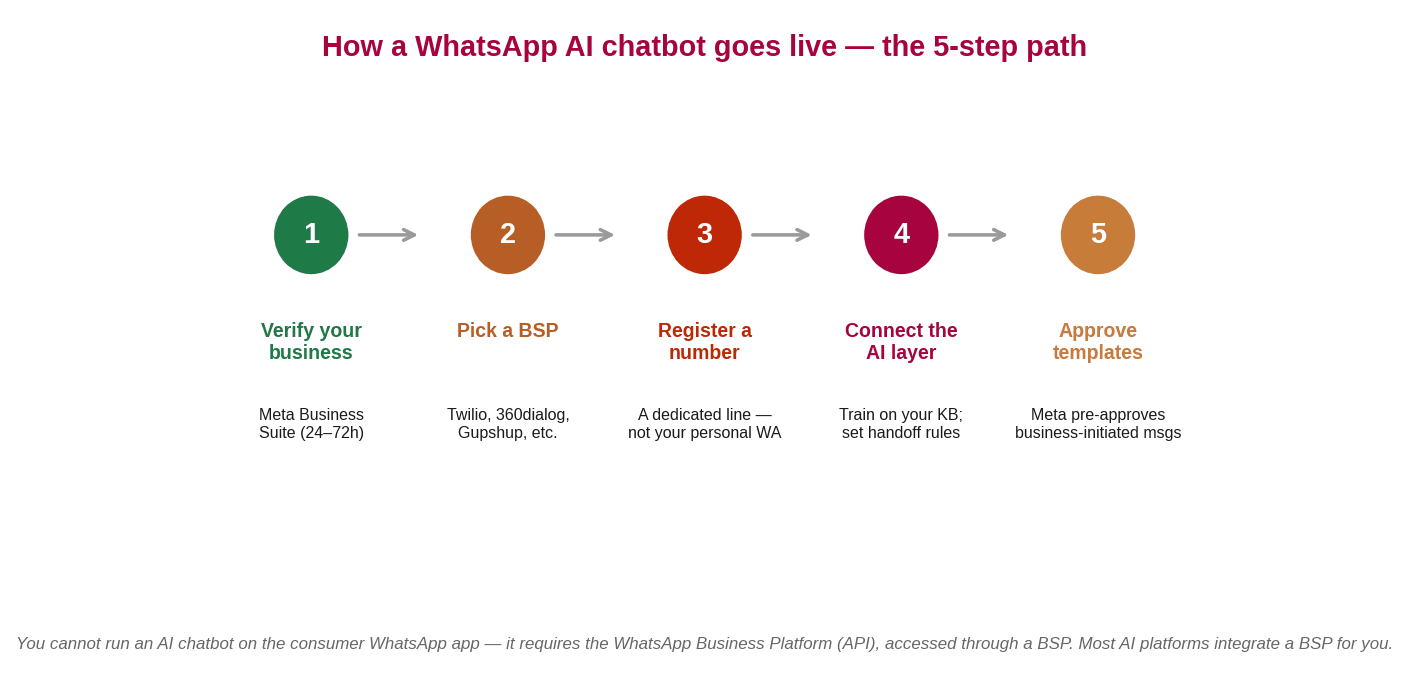
- Verify your business with Meta. In Meta Business Suite, create a verified business account with your business name, website and registration details. This typically takes 24 to 72 hours and is usually the longest single step.
- Choose a Business Solution Provider. Pick a BSP such as Twilio, 360dialog or Gupshup based on your market and budget. The BSP connects you to the WhatsApp Business Platform — and most AI chatbot platforms integrate one for you, so this can be nearly invisible.
- Register a dedicated phone number. Register a number through the BSP as your WhatsApp business identity. It has to be dedicated — you can't reuse a number already active on a personal WhatsApp or WhatsApp Business App account.
- Connect and train the AI layer. Connect your AI platform and train the agent on your knowledge base — help centre, product catalogue, policies, FAQs. Define what it should accomplish and when it should hand off to a human.
- Create and submit message templates. For any message you start outside the 24-hour service window — a reminder, an order update, a re-engagement — create a template and submit it to Meta for approval. User-initiated support replies don't need one.
The practical timeline: most of the elapsed time is Meta's verification. Once that clears, connecting a modern AI platform, registering the number and training the agent can happen in a day or two. The template-approval step runs in parallel and only gates business-initiated messaging, not inbound support.
What a WhatsApp AI chatbot does — use cases by industry
'Customer support' undersells it. The same channel does very different jobs depending on your industry — here's where it earns its keep.
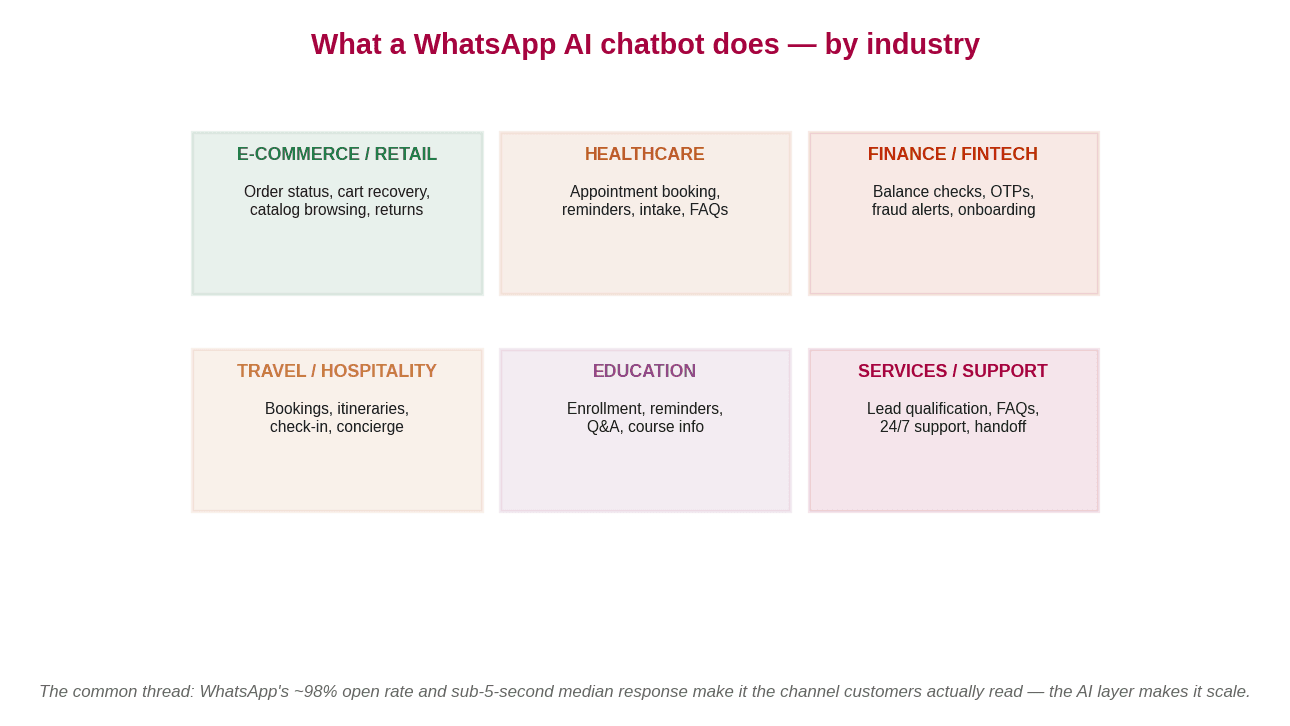
- E-commerce and retail. Order status, shipping updates, catalog browsing, and returns — plus cart recovery, which turns an abandoned checkout into a conversation.
- Healthcare. Appointment booking and reminders, intake, and FAQ handling — on a channel patients already use, with human handoff for anything clinical.
- Finance and fintech. Balance checks, one-time passcodes, fraud alerts and onboarding — the authentication category WhatsApp is built to support.
- Travel and hospitality. Bookings, itineraries, check-in, and concierge-style questions — in the traveller's pocket, across time zones.
- Education. Enrollment, deadline reminders, course information and Q&A — meeting students where their attention already is.
E-commerce and retail
E-commerce is where WhatsApp AI chatbots often show the fastest return, because cart recovery and order updates map so neatly onto a channel people actually open. If retail is your focus, our guide to AI chatbots for e-commerce goes deeper on the playbook, and AI for retail covers the vertical more broadly. This page keeps the wider lens: WhatsApp works across all six industries above, not just one.
What a WhatsApp AI chatbot costs in 2026 (the three layers)
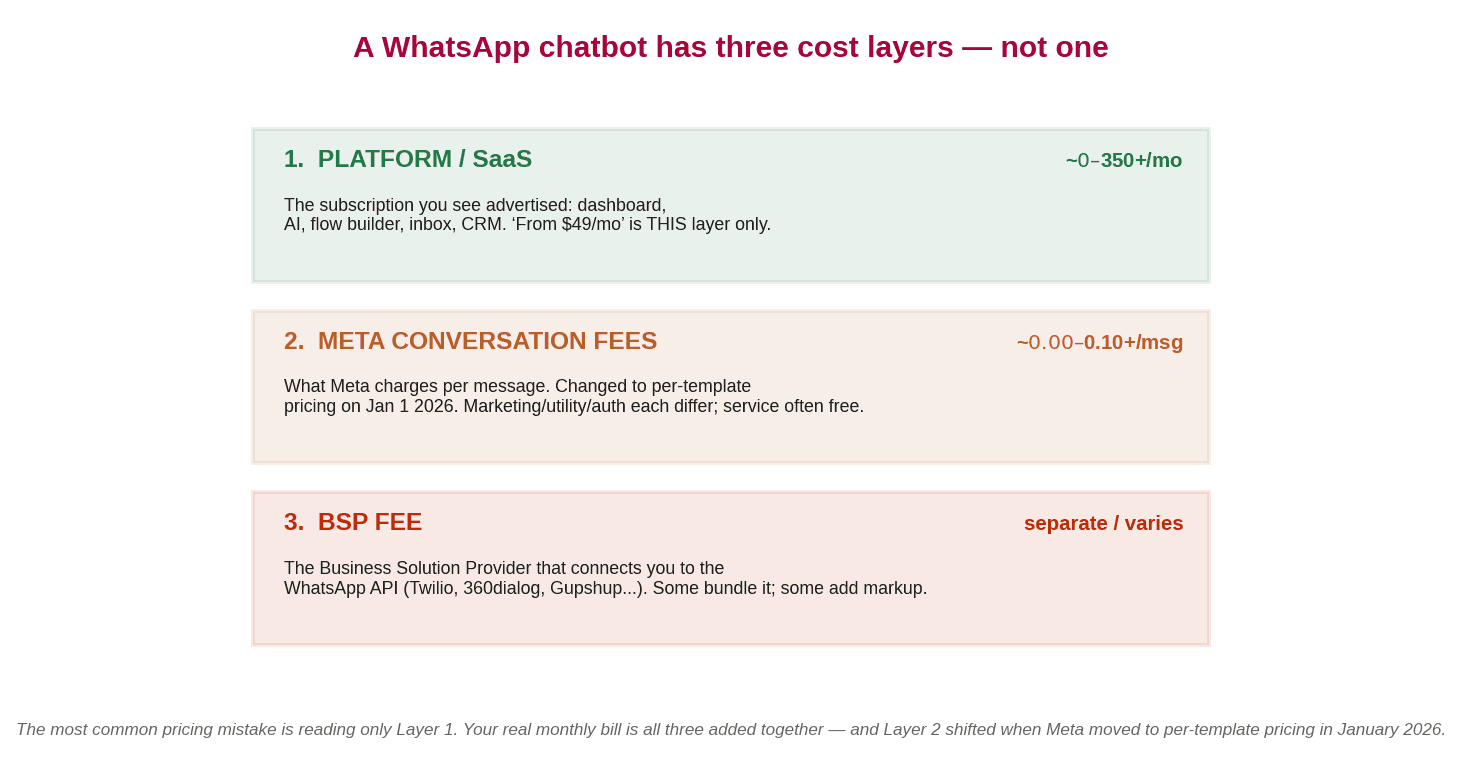
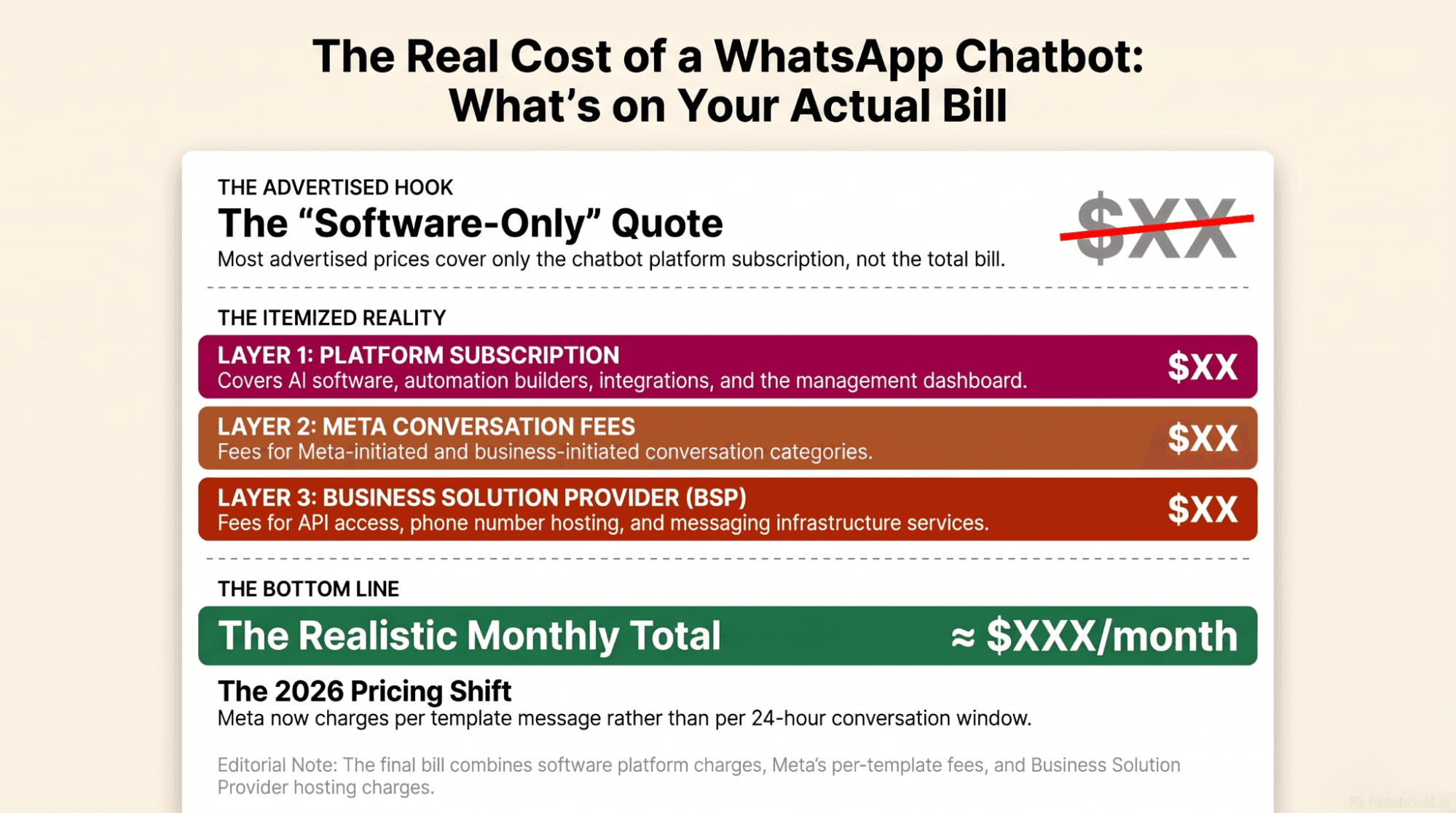
Here's the thing every pricing page should lead with and most don't: a WhatsApp chatbot doesn't have one price. It has three cost layers, and the number you see advertised is usually just the first.
| Layer | What it is | Roughly |
|---|---|---|
| 1. Platform / SaaS | The subscription you see advertised — dashboard, AI, flow builder, inbox, CRM | ~$0–$350+/mo |
| 2. Meta conversation fees | What Meta charges per message — per template since Jan 2026; varies by category and country | ~$0.00–$0.10+/msg |
| 3. BSP fee | The provider connecting you to the API — some platforms bundle it, some add markup | Separate / varies |
So the honest way to budget is to add all three, not read the first. A small business handling mostly user-initiated support — where Meta's service messages are often free — can stay well under $100 a month. A marketing-heavy or high-volume program, with lots of business-initiated template messages, costs considerably more. For the platform layer specifically, reported rates as of mid-2026 land in bands: budget no-code tools and free tiers at the low end, mid-market platforms in the low hundreds per month, and enterprise or high-contact plans higher. Always verify current numbers on Meta's WhatsApp pricing documentation and the provider's own page, because these change often and vary by country.
One cost trap worth naming: some platforms mark up AI-generated messages well above the underlying model cost. If you expect high volume, ask how AI usage is priced — a per-message markup can quietly dwarf the subscription, and a few platforms let you bring your own model key to avoid it.
The 2026 Meta pricing change
This is the accuracy point most guides miss. Effective January 1, 2026, Meta moved the WhatsApp Business Platform from conversation-based pricing to per-template message pricing. Instead of paying for 24-hour conversation windows, you now pay for each business-initiated template message, with different rates for marketing, utility and authentication categories, while user-initiated service conversations remain free in most markets. If a pricing guide is still describing 24-hour 'conversations,' it predates the change — check the current model on the WhatsApp Business Platform.
The tool landscape — and where SuperMIA fits
There are a lot of WhatsApp chatbot platforms, and they cluster into a few groups. Knowing the groups matters more than memorising names.
- WhatsApp-first SMB tools (Wati, Interakt, AiSensy) — quick no-code setup, strong in WhatsApp-first markets, lighter on deep AI. Wati's mid-tier is reported around $149 for five users; AiSensy offers a free API tier with AI as a paid add-on.
- Omnichannel inboxes (respond.io, Trengo) — WhatsApp plus every other channel in one place. respond.io is reported at $99–$349/month on monthly-active-contact pricing.
- Marketing-first builders (ManyChat, Chatfuel) — broadcast and campaign strengths, lighter agentic AI.
- AI-native platforms — built around a genuine AI agent that understands natural language and takes actions, rather than keyword rules with AI bolted on.
That last group is where SuperMIA's AI chatbot sits. It deploys on WhatsApp as an AI agent — trained on your knowledge base, connected to your systems, with human handoff — and the same agent works across your other channels too, so you're not rebuilding a separate bot per platform. If you're weighing channels more broadly, how chatbots compare to voice and IVR is useful context.
Honest guidance on choosing: if your entire operation is WhatsApp-only and you want the simplest possible start, a WhatsApp-first SMB tool may be all you need. If you need a genuine AI agent that spans WhatsApp and your other channels, connects to your systems, and doesn't mark up AI messages heavily, that's a different category — and the one worth comparing directly. Match the tool to your actual scope, not to whichever ranks first for 'best WhatsApp chatbot.'
Compliance and the rules you can't skip
WhatsApp is a permission-based channel, and Meta enforces that. A few rules are non-negotiable, and knowing them up front saves a rejected template or a suspended number later.
- Opt-in is required. You need a customer's consent before messaging them on WhatsApp. Buying a list and blasting it is against Meta's rules and a fast route to a ban.
- The 24-hour service window. When a customer messages you, a 24-hour window opens in which you can reply freely. Outside it, business-initiated messages must use a pre-approved template.
- Templates must be approved. Business-initiated messages — reminders, updates, promotions — need Meta's pre-approval, and promotional content has stricter rules than utility or authentication.
- Data protection still applies. GDPR and similar laws govern the conversation data you collect, just as they would anywhere else. Handle it accordingly.
None of this is onerous once it's set up — but it's the part that trips up teams who treat WhatsApp like an open broadcast channel. It isn't; it's a channel customers opted into, which is exactly why it works.
The best way to see whether a WhatsApp AI agent fits your use case is on a real conversation with your own scenario. You can see SuperMIA on WhatsApp and beyond against what you're actually trying to automate.
See a WhatsApp AI chatbot on your own use case — book a 15-minute demo →
Frequently asked questions
Can I add an AI chatbot to WhatsApp?
Yes, but not on the consumer WhatsApp app. An AI chatbot runs on the WhatsApp Business Platform, the official API, which you access through a Business Solution Provider such as Twilio, 360dialog or Gupshup. Most AI chatbot platforms integrate a provider for you, so in practice you connect your AI platform, verify your business with Meta, and register a dedicated number. Once live, the AI agent can answer questions, qualify leads, send order updates and book appointments directly inside WhatsApp.
How much does a WhatsApp AI chatbot cost?
A WhatsApp chatbot has three cost layers, so there is no single price. First, the platform subscription, which ranges from free tiers to a few hundred dollars a month. Second, Meta's per-message fees, which since January 2026 are charged per template message and vary by message category and country. Third, the Business Solution Provider fee, which some platforms bundle and others add on top. A small business handling mostly user-initiated support can stay under a hundred dollars a month, while high-volume or marketing-heavy programs cost considerably more.
Do I need the WhatsApp Business API for a chatbot?
Yes for a genuine AI chatbot at business scale. The free WhatsApp Business App offers only basic automated replies and away messages, not a full AI agent. Anything that understands natural language, connects to your systems, handles high volume or sends business-initiated template messages requires the WhatsApp Business Platform, the API, which is accessed through a Business Solution Provider.
What changed with WhatsApp pricing in 2026?
Effective January 1, 2026, Meta moved the WhatsApp Business Platform from conversation-based pricing to per-template message pricing. Instead of paying for 24-hour conversation windows, businesses now pay for each business-initiated template message, with different rates for marketing, utility and authentication categories. User-initiated service conversations remain free in most markets. Any guide still describing the old conversation-based model is out of date, so verify current rates in Meta's documentation.
Is there a free WhatsApp AI chatbot?
There are free platform tiers and free trials, but the channel is not entirely free because Meta's per-message fees and any provider costs still apply. Some platforms offer a free plan and free access to the WhatsApp Business API, and user-initiated service messages are free in most markets, so a low-volume support use case can be very inexpensive. A genuinely capable AI agent with business-initiated messaging, however, will incur costs across the platform, Meta and provider layers.

Urvil Dhanani
Urvil Dhanani is the AI/ML Lead at SuperMIA, focused on the architecture behind reliable conversational AI - agent design patterns, voice and chat orchestration, and platform evaluation. He writes practical, vendor-neutral guides that help technical teams build and choose AI systems that hold up in production.