
Table of Contents
To add an AI chatbot to your website, pick a platform, train it on your site content, paste one line of embed code into your page's <head>, test it, and go live — often under 30 minutes with a no-code tool. Expect $15–$300/month for most sites; watch per-resolution pricing, which can balloon at scale. It pays for itself once deflected support plus captured leads exceed the subscription.
See a website chatbot trained on your own content →
Key takeaways
- Setup is genuinely fast: train on your content, paste one embed line, test, launch — no developer for no-code tools.
- The pricing model matters more than the sticker price — per-resolution can cost 60x+ more than flat at scale.
- Train it on YOUR content, or it gives generic answers that erode trust instead of building it.
- ROI is simple to model: deflected support + captured leads vs the monthly cost. Run the formula before you buy.
- Don't add one if your traffic is tiny or your questions are all account-specific and sensitive.
What an AI chatbot actually does on your website
An AI chatbot for your website is a conversational widget, powered by a large language model and trained on your own content, that answers visitor questions, deflects support tickets, and captures leads 24/7 — without a human for routine cases.
The important word is "trained." A chatbot that only uses generic AI knowledge guesses at your return policy. One trained on your pages answers "we accept returns within 30 days, in original packaging — here's the link." That specificity is the difference between building trust and eroding it.
If you want the product view, SuperMIA's AI chatbot trains on your site content and hands off to a human when needed. This guide stays vendor-neutral and walks the process.
How to add an AI chatbot to your website (5 steps)
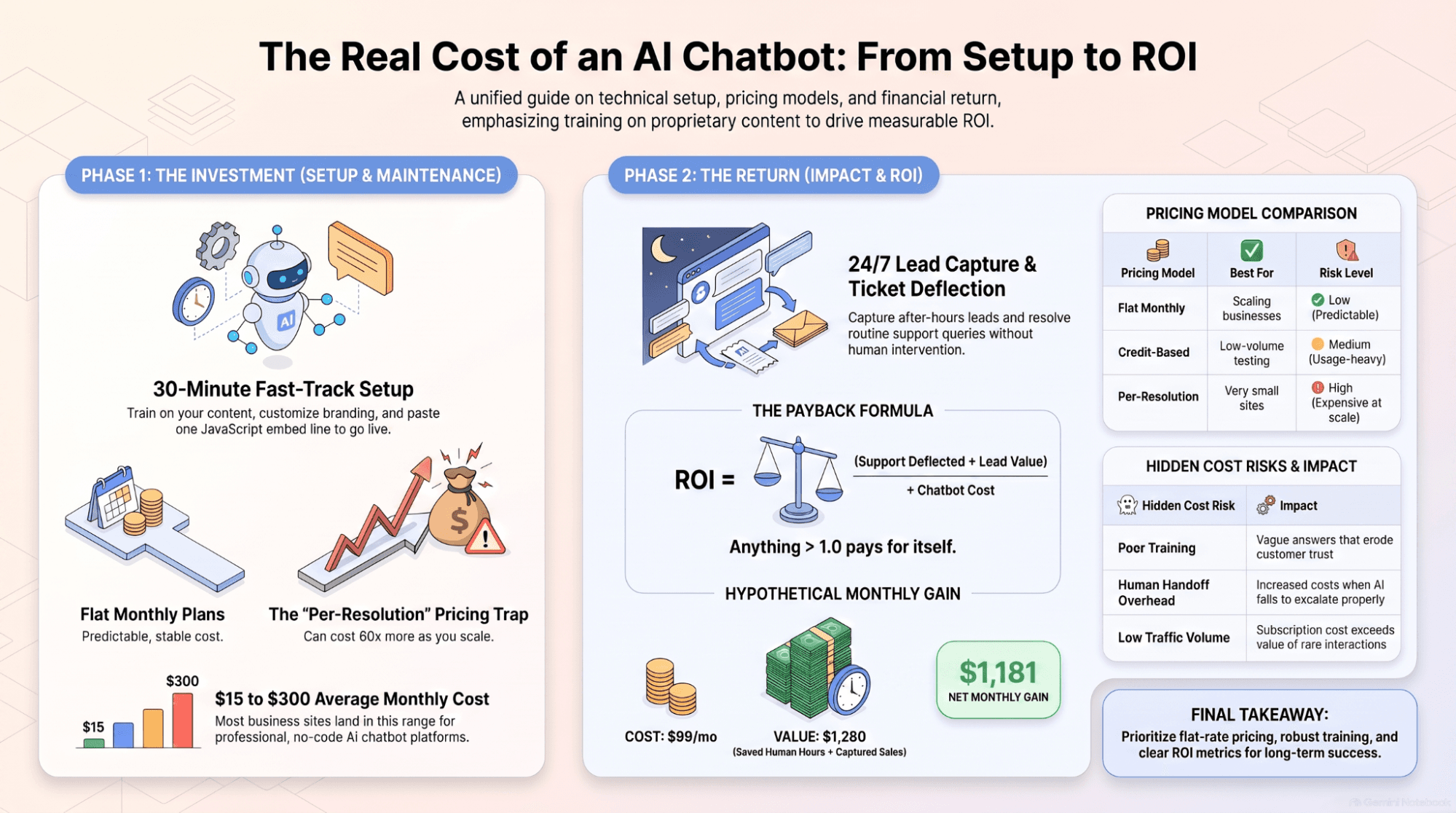
For a no-code tool, the whole thing takes under 30 minutes and needs no developer.
- Pick a platform that trains on your content. Choose one that crawls your site, docs, and FAQs so it answers from your data, not generic AI.
- Train it on your site. Point it at your URL and let it ingest your pages, help center, and product info — a few minutes for most sites.
- Customize tone, greeting, and escalation. Set the name, brand color, opening message, and the rule for when it hands off to a human.
- Paste the embed code into your <head>. Copy the single line of JavaScript; on WordPress use a header plugin, on Shopify use your theme header.
- Test on your live site, then launch. Open your site in an incognito window and ask a business-specific question. If it answers correctly, you're live.
Not sure which platform to start with? How to choose the right chatbot scores vendors on the criteria that matter — this guide assumes you've picked one.
How much does an AI chatbot for a website cost?
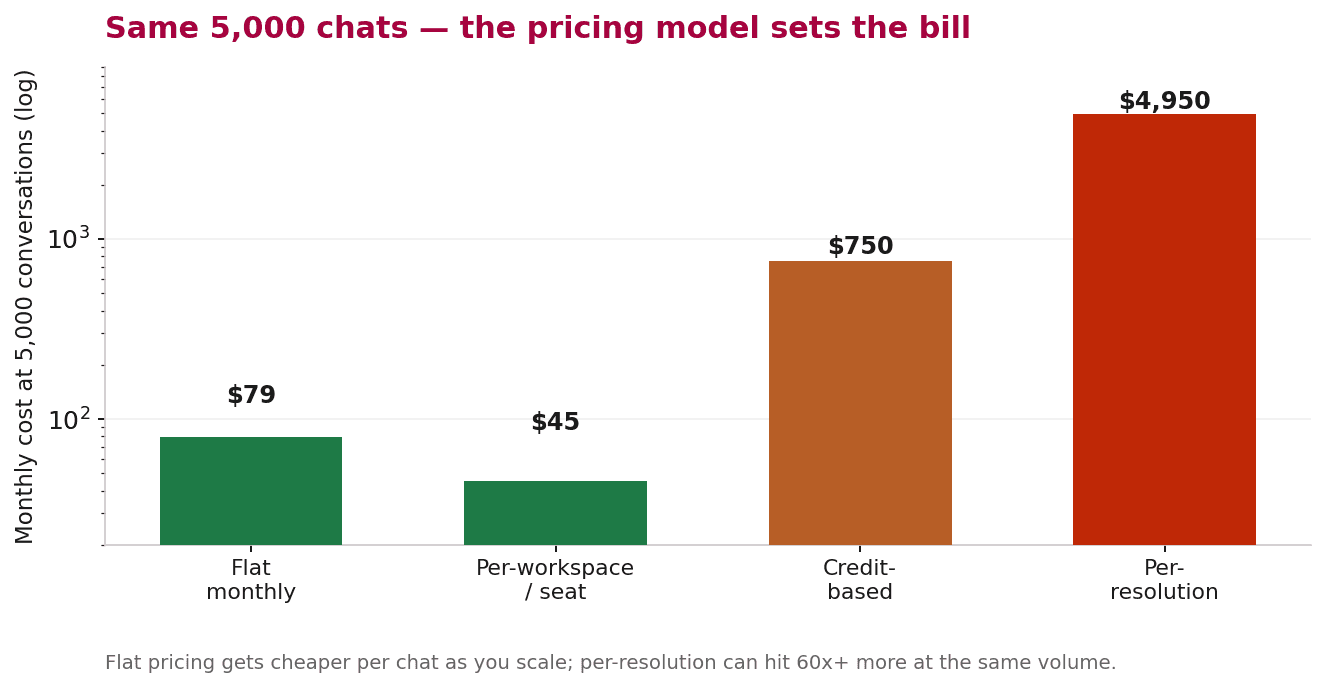
Most business websites run a capable AI chatbot for $15–$300 a month. But here's the trap the sticker price hides: the same 1,000 conversations can cost anywhere from $15 to nearly $5,000 depending on the pricing model.
| Pricing model | How it works | What to expect |
|---|---|---|
| Flat monthly | One fixed price, high message volume included | Gets cheaper per chat as you grow; safest for scaling sites |
| Per-workspace / seat | Fixed plan tied to seats or workspace | Predictable, but AI usage doesn't lower the base cost |
| Credit-based | Buy message credits; each message spends one | Long conversations burn credits fast |
| Per-resolution | Pay for every ticket the AI resolves | Cheap at low volume, brutal at scale — the trap |
Building one in-house is a different budget entirely — see building one in-house vs buying for the full TCO. For most site owners, a flat no-code plan is the right first move.
The ROI: will it pay for itself?
You don't need a spreadsheet to sanity-check this. The payback formula is:
Payback ratio. Payback = (monthly support deflected + monthly leads captured × close rate × deal value) ÷ monthly chatbot cost. Anything above 1.0 means it pays for itself.
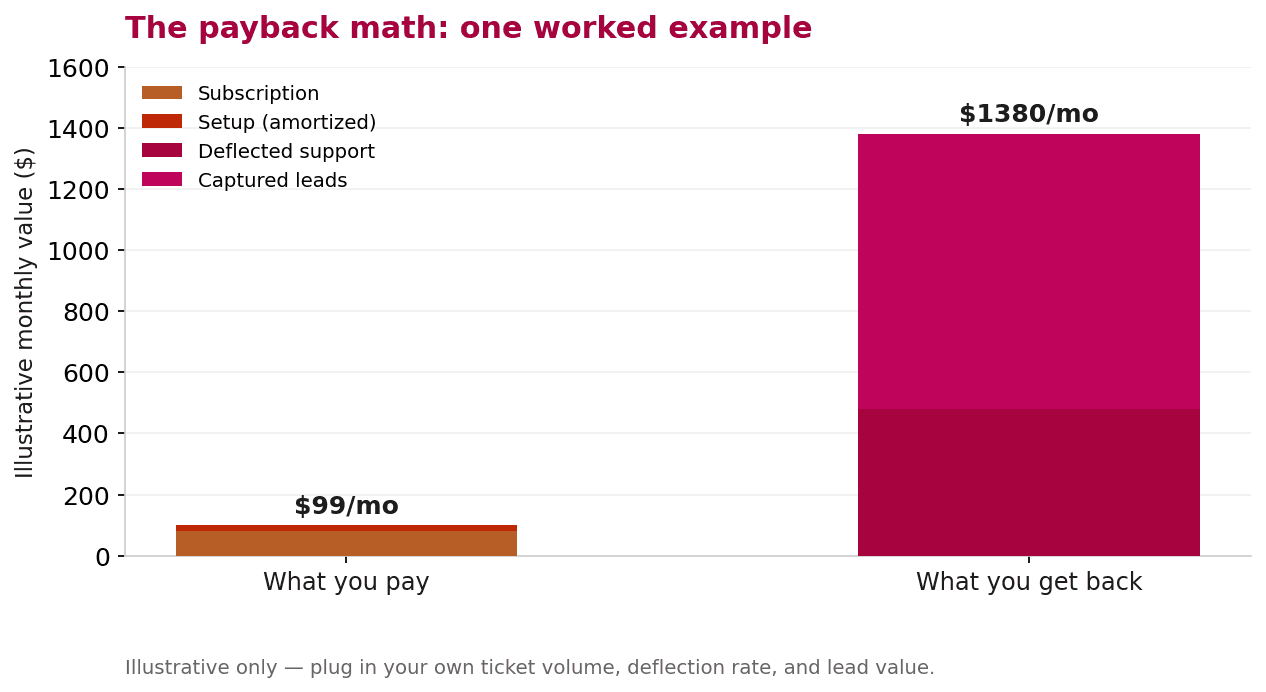
Two levers drive the return: support you no longer pay a human to handle, and after-hours leads you'd otherwise miss. Because a single captured lead is often worth more than a month of subscription, the math is forgiving for most sites with steady traffic.
For the full cost-per-ticket model with your own volumes, use the full chatbot ROI breakdown — it goes deeper than we will here.
When a website chatbot is the wrong move
The honest part vendors skip. A website chatbot isn't always the right call:
- Tiny traffic. If only a handful of visitors a week reach your site, there isn't enough volume to deflect or capture — the subscription won't earn its keep.
- Only sensitive, account-specific questions. If every query needs authentication or private data, a generic web widget can't safely help and will frustrate people.
- No content to train on. A chatbot is only as good as the pages it learns from; a thin site produces vague answers.
- Phone is your real channel. If most missed opportunities are calls, not web visits, a voice agent fits better than a chat widget.
Running a store instead? An AI chatbot for e-commerce covers the cart-recovery and product-Q&A angles specific to Shopify and WooCommerce.
The honest rule. Add a website chatbot when you have real traffic, content to train it on, and repetitive questions worth deflecting. Skip it — or choose voice instead — when you don't.
Frequently asked questions
How do I add an AI chatbot to my website?
Pick a platform that trains on your content, point it at your URL to ingest your pages, customize the tone and escalation rule, paste the single line of embed code into your site's head section, then test on your live site and launch. For a no-code tool this usually takes under 30 minutes and needs no developer.
How much does an AI chatbot for a website cost?
Most business websites run a capable AI chatbot for $15 to $300 per month. The pricing model matters more than the sticker price: flat monthly plans stay fixed as you grow, while per-resolution pricing can cost 60 times more at higher volumes. Custom builds run far higher and only make sense at scale.
Do I need a developer to install a website chatbot?
No, not for a no-code tool. You paste one line of JavaScript into your page's head section, which most site owners can do through a header plugin or theme setting. Only custom-built or deeply integrated chatbots typically need developer time.
Is an AI chatbot worth it for a website?
It is worth it when the value of the support it deflects plus the leads it captures exceeds its monthly cost. For most sites with steady traffic that math works quickly, because one or two captured after-hours leads can cover an entire month. It is not worth it for very low-traffic sites or purely sensitive, account-specific queries.
Can an AI chatbot learn from my website content?
Yes, and it should. A chatbot trained on your pages, policies, and product data answers with specifics from your business instead of generic AI guesses. Training on your own content is the single biggest factor in whether the chatbot builds trust or erodes it.
Start with one page, trained on your content
The setup is fast, the cost is small if you avoid the per-resolution trap, and the payback is easy to model. Pick a flat plan, train it on your site, paste the embed, and measure deflection and captured leads for two weeks.
Want to see it trained on your own content before you commit? Book a demo and we'll show SuperMIA's AI chatbot answering questions from your actual site.

Urvil Dhanani
Urvil Dhanani is the AI/ML Lead at SuperMIA, focused on the architecture behind reliable conversational AI - agent design patterns, voice and chat orchestration, and platform evaluation. He writes practical, vendor-neutral guides that help technical teams build and choose AI systems that hold up in production.